Overview
At Infrassist, we often encounter complex IT and networking challenges in small to mid-size business environments. One such interesting case involved a customer facing severely degraded Wi-Fi speeds despite having upgraded to high-end networking gear. What appeared to be a standard access point installation issue turned into a deep-dive into hardware behaviour and switch-level configurations. Here’s how we uncovered the real problem, fixed it, and optimized the guest network without touching VLANs.
The Challenges
The client had recently purchased:
- 5x Grand stream Wi-Fi 5 Access Points
- 1x TP-Link 8-Port Gigabit PoE Unmanaged Switch with 2 Uplink Ports
Despite having a 1 Gbps internet connection, users experienced speeds as low as 100 Mbps over Wi-Fi. In some areas, speeds were even worse.
Initial Findings
Our baseline testing revealed:
- 4 of the 5 APs were negotiating at 1 Gbps on their LAN ports.
- The firewall LAN interface was also at 1 Gbps.
- However, the AP located in the CEO’s cabin was only negotiating at 10 Mbps—a significant anomaly.
On-Site Investigation
Our engineering team visited the site and discovered:
- The uplink from the PoE switch to the upstream switch was negotiating at just 100 Mbps. Switching this to a gigabit port resolved the issue for 4 APs. Post-fix Wi-Fi speeds jumped to 350-400 Mbps up/down.
- The CEO’s AP continued to negotiate at only 10 Mbps.
Deeper Diagnosis
We brought the suspected AP back to our lab
- It negotiated 100 Mbps on a basic 10/100 PoE switch.
- It successfully negotiated 1 Gbps on a gigabit PoE switch.
This confirmed the AP was functional.
The Discovery
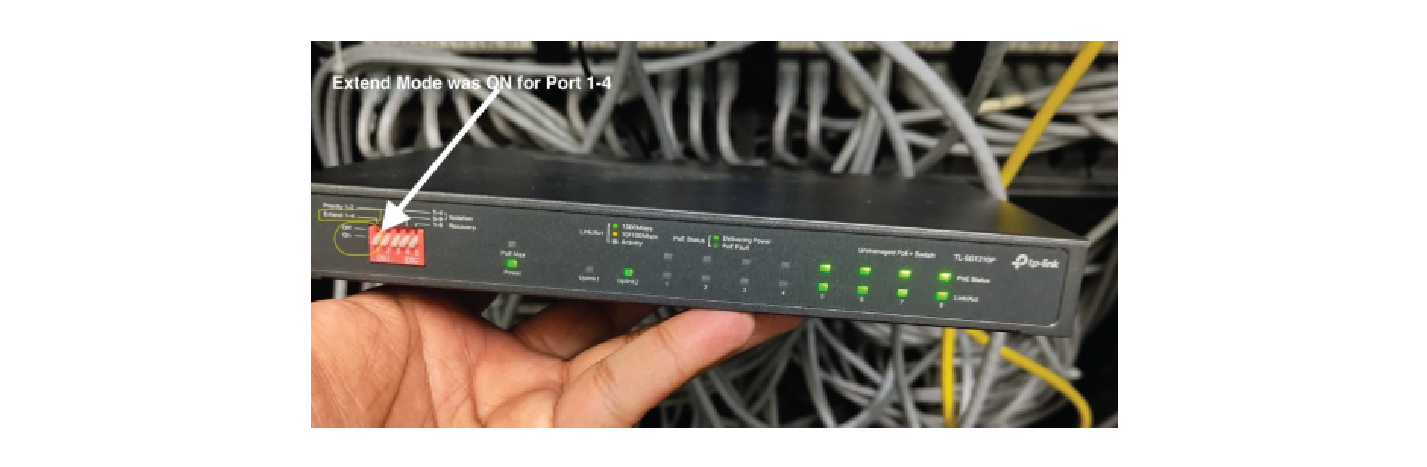
Upon further inspection of the TP-Link PoE switch specs, we identified a feature called Extend Mode. When enabled, this limits port speed to 10 Mbps, typically used for long-distance PoE connections (e.g., CCTV beyond 100 meters).
We requested a photo of the client’s PoE switch and confirmed that Extend Mode was enabled on Ports 1-4.
The Resolution
During a follow-up site visit, we:
- Disabled Extend Mode on Ports 1-4.
- Reconnected the AP in the CEO’s cabin.
Wi-Fi speeds immediately reached 500 Mbps up/down, bringing a smile to the client’s face.
Technologies Used
The client also wanted a secure guest Wi-Fi network without additional VLAN or routing complexity. We configured the following:
- NAT Mode SSID on all 5 APs.
- Bandwidth restricted to 100 Mbps (10% of pipe).
- Client isolation enabled to block LAN access.
- Captive Portal with Voucher-Based Access and branding-aligned splash screen.
Outcome
- Stable, high-speed wireless coverage across all departments.
- Secure guest access isolated from production network.
- Happy and satisfied client who praised our expertise and structured troubleshooting.
Takeaway
This project exemplifies the importance of looking beyond the obvious in network issues. Understanding how unmanaged switches behave, reading product manuals, and validating link negotiation are essential skills for any modern IT partner. If you’re facing wireless performance issues or looking for expert network design and support, our team at Infrassist is here to help.