Choosing a cloud platform is one of those decisions that looks straightforward on paper and gets complicated fast in practice. The options are well-marketed, the feature lists overlap considerably, and the pricing models take real effort to compare accurately.
Microsoft Azure sits near the top of most shortlists, and for good reason. This blog gets into what actually makes it worth considering, where it falls short, and how it stacks up against AWS, so you can form a view based on what matters to your organization specifically.
What Is Microsoft Azure?
Most people asking what Microsoft Azure is already have a sense of the answer. It is Microsoft’s cloud platform: compute, storage, networking, databases, security, and analytics. What that description misses is context. Azure is not interesting because of its feature list. It is interesting because of how it connects to the Microsoft infrastructure and Microsoft 365 productivity suite that businesses have been running for years. That connection is what drives the adoption numbers.
That connection becomes much clearer once you understand what Microsoft Azure is and what it brings to the table.
Why the Market Has Landed on Azure
More than 95% of Fortune 500 companies run on Azure, per Microsoft’s own reporting. That is not a minor footnote. It reflects how deeply the platform has embedded itself in enterprise operations over the past decade. These are not organizations piloting it cautiously on a side project. For most of them, Azure is already core infrastructure.
The adoption is not driven by marketing. It is driven by the weight of existing Microsoft investment. Organizations running Windows Server, SQL Server, or Dynamics 365 do not re-platform lightly. The cost of rebuilding identity, licensing, and integrations from scratch is high enough. Azure, avoiding most of that cost, becomes the inevitable choice.
And it is not just large enterprises. Mid-market businesses with ten-year-old Microsoft environments are making the same call for the same reasons.
Microsoft Azure Advantages That Actually Move the Needle
Scaling Without Carrying Dead Weight
Most workloads are not flat. A retail business managing peak season traffic needs dramatically different capacity in November than it does in April. A software company mid-launch operates at a spike that disappears in two weeks. On-premises infrastructure handles this badly. You size for the worst case and carry that cost all year, regardless of actual usage.
Azure auto-scales and compute adjusts with actual demand. The best part is that resources not in use are not paid for. For dev and test environments running intermittently, this keeps a slew of unnecessary infrastructure costs at bay that on-premises setups accumulate quietly over time. It is not a revolutionary concept, but Azure’s execution is mature, and the savings are real.
Security and Compliance That Regulated Industries Need
Security is where Azure’s enterprise positioning becomes most apparent. The platform’s security stack is genuinely deep.
Azure Active Directory happens to be the starting point for most deployments. It handles identity across cloud and on-premises from a single directory, which makes a vital difference when users and applications exist in both places.
Defender for Cloud sits on top, watching for threats continuously and scoring security posture as it goes. DDoS mitigation is built in across all services. On the compliance side, Azure holds certifications across 100+ regulatory standards, HIPAA, ISO 27001, SOC 2, and GDPR being the major ones among them.

For healthcare, finance, and government organizations, that last point removes a significant amount of independent compliance work. Building that coverage from scratch takes time and budget most teams do not have to spare. On Azure, it largely comes with the platform. Layering in Azure cloud security best practices covers most of what the defaults leave open.
Cost That Rewards Planning
Pay-as-you-go is the foundation. The meaningful savings sit elsewhere, and most organizations underuse them.
- Reserved Instances cut costs by up to 72% for workloads with predictable consumption, in exchange for a one or three-year commitment. For most enterprise workloads, that is not a difficult trade to justify.
- Azure Hybrid Benefit lets organizations carry existing Windows Server and SQL Server licenses into Azure. This one comes in handy more than most businesses expect, particularly those that have been on Microsoft infrastructure for years and are effectively paying for those licenses twice without realizing it. So, why pay again?
- Azure Cost Management provides native spend visibility, budget alerts, and optimization recommendations without a third-party tool.

The Hybrid Benefit alone can shift the cost comparison against AWS significantly for Microsoft-heavy environments. Worth modeling before drawing conclusions about which platform is cheaper.
Why Azure’s Hybrid Capabilities Set It Apart
Real migration projects hit walls. A legacy ERP that cannot be containerized. Data that legally cannot leave a specific country. Workloads where latency rules out a round-trip to the cloud. These are not edge cases: they are common enough that any honest cloud strategy has to account for them upfront.
Azure Arc brings Azure’s management layer to on-premises servers, edge locations, and workloads sitting on other cloud platforms. Azure Stack goes further. It runs Azure services locally, for situations where data physically cannot go to a public cloud.
The result is one operational model across all of it, rather than separate governance processes running in parallel.
Without a shadow of a doubt, this is where Azure has its clearest lead. Neither AWS nor Google Cloud has built a hybrid story at this level of maturity.
This gap has been wide for a while now and quite unlikely to close soon enough. For organizations weighing Azure cloud computing strengths and weaknesses against its alternatives, that gap tends to be a determining factor.
The Microsoft Ecosystem Edge
Organizations already running Microsoft 365, Teams, Dynamics 365, or Windows Server will find this straightforward in practice. Azure connects to all of it natively.
The connectors are already in place. Teams and Azure Active Directory share the same identity layer. SQL Server instances on-premises talk to Azure SQL directly, no middleware required. Power BI pulls from Synapse without a data movement exercise first.
Policy management stays unified across cloud and on-premises through one directory. For organizations that have spent years on Microsoft infrastructure, none of this is a feature to get excited about. It is just the baseline expectation, and Azure meets it.
So what about a business that’s already deep in the Microsoft ecosystem? This is undoubtedly the lowest-friction path to cloud infrastructure available. The move feels less like a migration and more like an extension of what is already there.
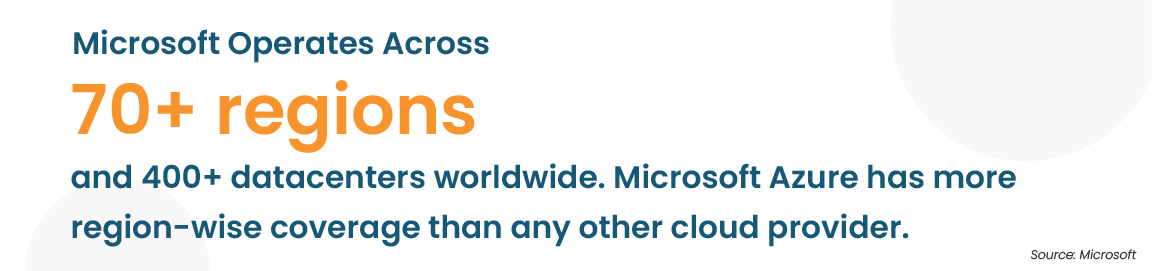
Azure operates across 70+ regions worldwide, more than any other major cloud provider. For businesses with a myriad of international operations, applications run closer to end users, data stays within specific regions for residency compliance, and disaster recovery spans regions without external tooling.
The performance and governance benefits are evident for any organization managing distributed infrastructure today, and they compound at scale.
AI and Analytics Without Building the Foundation
Azure Machine Learning, Azure Cognitive Services, and Azure OpenAI Service give organizations access to AI capabilities that most would not be able to build themselves at a comparable cost or timeline.
On the data side, Azure Synapse Analytics and Azure Data Factory cover ingestion, transformation, and reporting as a connected pipeline. It eliminates the need for a set of separate tools requiring custom connectors to function together.
Since none of this is plug-and-play, configuring these environments correctly takes experience, and mistakes at this stage are expensive to unwind. For organizations without that in-house, an Azure managed services partner tends to pay for itself, in avoided rework as much as in setup speed.
Pros and Cons of Microsoft Azure
No platform delivers everything. Here is an honest look at the advantages and disadvantages of Microsoft Azure:
Where Azure holds up:
- Compliance coverage that handles regulated industries without significant customization work
- Hybrid cloud maturity that no major competitor has matched at this level
- Deep, native Microsoft ecosystem integration that reduces implementation friction considerably
- Widest global region footprint among major cloud providers
- An AI and analytics portfolio that continues to expand at a meaningful pace
Where Azure creates friction:
- Pricing is genuinely complex. The catalog is vast, pricing variables are numerous, and forecasting spend accurately without prior Azure experience is difficult. Budget surprises are common for teams learning the platform
- The sheer range of services is daunting at the outset. The learning curve is steeper than Azure’s own documentation implies, and organizations consistently underplan for it
- Some services, particularly in developer tooling and certain data categories, still lag AWS equivalents in depth
- Enterprise support tiers are expensive and frequently catch organizations off guard at budgeting time
Azure vs AWS: What’s the Real Difference
The Microsoft Azure pros and cons versus AWS question has a fairly consistent answer. It depends almost entirely on what the organization is already running.
Azure is the stronger fit for Microsoft-first environments. The ecosystem integration, hybrid capabilities, and license portability create advantages AWS does not have in those contexts. AWS carries a broader service catalog in certain categories and suits cloud-native builds starting from scratch more naturally. The gap between the two has narrowed, but the starting point still determines the better fit in most cases.
| Microsoft Azure | AWS | |
|---|---|---|
| Best for | Microsoft-heavy environments | Cloud-native workloads |
| Hybrid cloud | Azure Arc and Azure Stack | AWS Outposts |
| Cost model | Pay-as-you-go plus Hybrid Benefit | Pay-as-you-go plus Savings Plans |
| Global regions | 60+ | 33+ |
| AI and ML | Azure OpenAI, Cognitive Services | SageMaker, Bedrock |
Teams evaluating a platform switch will find the AWS to Azure migration guide useful for understanding what is actually involved before committing.
Move to Azure with Professional Expertise & Consultation
Get practical guidance on migration, cost control, security, and hybrid infrastructure from Azure specialists who work alongside MSPs every day.
Most Used Azure Services
Azure Virtual Machines handle compute across most workload types. Blob Storage is where unstructured data lives at scale. Active Directory runs identity. AKS manages containers. Azure SQL is the managed relational database most teams reach for first; Azure DevOps handles CI/CD end-to-end; Defender for Cloud covers security monitoring; and Synapse Analytics takes care of warehousing and reporting. These eight services account for the bulk of enterprise Azure spend across most deployments.