Azure cost mistakes cost businesses more than they think. According to Flexera’s 2024 State of the Cloud Report, organizations waste an average of 32% of their cloud spend. A large share of that waste often sits in Microsoft Azure.
This is not a technology failure. It is a visibility and governance gap.
Companies move to Azure for speed, flexibility, and scalability. They want to launch faster, grow without infrastructure limits, and support innovation without delays. Azure delivers on those expectations.
The problem starts when cost management does not keep pace with growth. Resources remain larger than necessary. Discounts are not applied. Storage sits in expensive tiers. Small oversights continue month after month.
Azure cost optimization is not about cutting back. It is about creating structure, improving visibility, and ensuring that every dollar spent in Azure supports real business outcomes.
With this in mind, let’s explore a few solid reasons why Azure costs tend to shoot up and how to prevent this from happening.
Why Azure Costs Can Spiral
If you’ve used Azure, you probably know that it doesn’t get expensive overnight. The costs add up without coming into anyone’s notice in small ways that go ignored.
A new deployment goes live, or a temporary resource is never decommissioned, or a workload scales up without ever scaling back down. The impact does become visible over time, and that’s usually when the finance team starts asking questions.
Azure is powerful enough to equip teams with speed, flexibility, and control. However, without clear and updated limits, it can lead to unnecessary spending. Most cost escalations begin with small, reasonable decisions that are never revisited, even as needs and processes change.
Complexity in Offers
Azure is much more than a platform for migrating virtual machines and storage accounts. It includes hundreds of services, multiple pricing tiers, consumption-based billing models, Reserved Instances, spot pricing, dev/test rates, Hybrid Benefits, data transfer fees, and region-based cost variations.
Amid these multiple options, even experienced teams can find it difficult to track how everything fits together.
It’s also true that a choice/setup that made sense during a quick-deployment phase may not remain cost-effective in the longer term. For example, on-demand virtual machines might continue running when Reserved Instances would be more economical.
Further, storage transactions, backups, monitoring, and outbound data transfer charges add layers that are easy to overlook. Basically, without structured Azure cost optimization, this complexity turns into ongoing financial leakage.
How Oversights Happen
Overspending in Azure is rarely the result of negligence or poor intent. In most cases, teams make rational decisions in the moment to deliver faster, avoid downtime, or prevent performance issues. The problem here is not carelessness, but continuity without reassessment.
A developer may select a larger virtual machine to avoid performance risk. Or a testing environment might remain active beyond business hours. Disks from old migrations might never be deleted, or public IP addresses can remain unused while still generating charges.
Many organizations only recognize a cost issue after budgets are exceeded. This is why consistent monitoring, clear governance policies, proper tagging, and routine reviews are essential. These practices serve as fundamental controls that protect long-term cloud sustainability.
The Common Yet Costly Azure Mistakes (and How to Fix Them)
| Azure Cost Mistake | Business Impact | How to Fix It |
| Overprovisioning | Paying for unused compute, memory, or storage capacity month after month | Conduct regular utilization reviews, rightsizing based on real metrics, and implement autoscaling where appropriate |
| Forgetting About Discounts | Higher long-term costs due to reliance on pay-as-you-go pricing | Identify steady workloads, use Reserved Instances or Savings Plans, and apply Hybrid Benefits where eligible |
| Not Watching Your Spend | Budget overruns and reactive financial management | Set budgets and alerts in Azure Cost Management, build dashboards, and enforce structured tagging |
| Storage Choices That Cost Too Much | Inflated monthly bills due to mismatched storage tiers | Align storage tiers with access patterns and apply lifecycle management policies |
| Ignoring Automation | Idle resources continue billing, manual errors increase waste | Automate shutdowns for non-production environments and enforce governance policies |
| Lack of Governance and Clear Ownership | Limited accountability and uncontrolled resource sprawl | Implement tagging standards, approval workflows, and defined budget thresholds |
| Trying to Do Everything Alone | Strained internal teams and inconsistent cost oversight | Partner with experienced Azure specialists for structured monitoring, optimization, and ongoing management |
Once Azure is live, most teams move on to bigger priorities, like performance, security, new deployments, deadlines, and so on. As a result, costs can slide into the background, causing trouble later on.
Azure overspending is typically gradual and rooted in day-to-day, well-intentioned decisions that teams fail to revisit. Fortunately, each one of them is fixable with consistent Azure cost optimization practices.
Let’s take a look at some of the common mistakes that can prove to be expensive in the long term.
Overprovisioning
When something important is launching, the last thing you want to deal with is performance issues. Teams, therefore, provision larger virtual machines, extra storage, and more capacity than they might actually need. At the time, it feels responsible.
It’s important to remember that the issue does not lie in the initial decision, but in leaving it unchanged long after demand stabilizes.
How to fix it:
- Review performance metrics regularly.
- Look at actual CPU, memory, and disk usage instead of assumptions.
- Resize virtual machines based on data.
- Use autoscaling where traffic fluctuates.
Forgetting About Discounts
Azure offers several ways to lower costs, including Reserved Instances, Savings Plans, Hybrid Benefits, and dev/test pricing. Many teams avoid them because they seem complex or require commitment. However, avoiding them completely often means paying more than necessary.
How to fix it:
- Identify workloads that run consistently throughout the year. These are strong candidates for Reserved Instances or Savings Plans.
- If your organization already owns Windows or SQL licenses, apply Hybrid Benefits to reduce compute costs.
- Review usage quarterly and adjust commitments strategically to ensure optimal allocation.
Not Watching Your Spend
Cloud costs do not send warning messages before increasing. The problem arises mainly because most organizations only review costs when the finance team raises concerns. At this point, the conversation becomes more reactive than preventative.
How to fix it:
- Set clear budgets within Azure Cost Management.
- Enable automated alerts before thresholds are crossed.
- Build dashboards that show spending trends across subscriptions and teams.
- Tag resources clearly so ownership is obvious. When visibility improves, waste becomes easy to detect.
Storage Choices That Cost Too Much
The premium storage option is usually considered the safest option. It comes with all of the useful tools and delivers high performance, so teams often default to it. However, not all data needs that level of speed. Keeping infrequently accessed data in high-cost tiers can inflate monthly expenses. Storage optimization, on the other hand, rarely affects performance but often delivers noticeable savings.
How to fix it:
- Match storage tiers to actual usage patterns.
- Move older or rarely accessed data into cooler or archival tiers.
- Implement lifecycle policies that automatically transition data as it ages.
Ignoring Automation
Manual supervision may work at a smaller scale, but it might struggle in dynamic cloud environments. Running a business in modern times means test environments stay online after hours, temporary deployments remain active, and orphaned resources continue billing simply because teams forgot they exist. In such cases, automation creates consistency and reduces reliance on memory.
How to fix it:
- Schedule automatic shutdowns for non-production environments.
- Use Azure policies to enforce tagging and configuration standards.
- Automate cleanup processes to remove unused resources.
Trying to Do Everything Alone
Over the years, Azure has grown into a complex ecosystem, with architecture, security, governance, compliance, and cost management all requiring equal attention. Expecting one internal team to manage everything flawlessly while delivering projects is demanding. This is where structured support makes a difference.
- Azure managed service providers work alongside MSPs and businesses to manage Azure environments, optimize performance, and maintain financial discipline.
- With their help, organizations can finally operate with a clear plan and ongoing oversight, instead of reacting to invoices.
- When visibility, governance, and the right expertise come together, Azure becomes a growth platform rather than a hotbed of financial aftershocks.
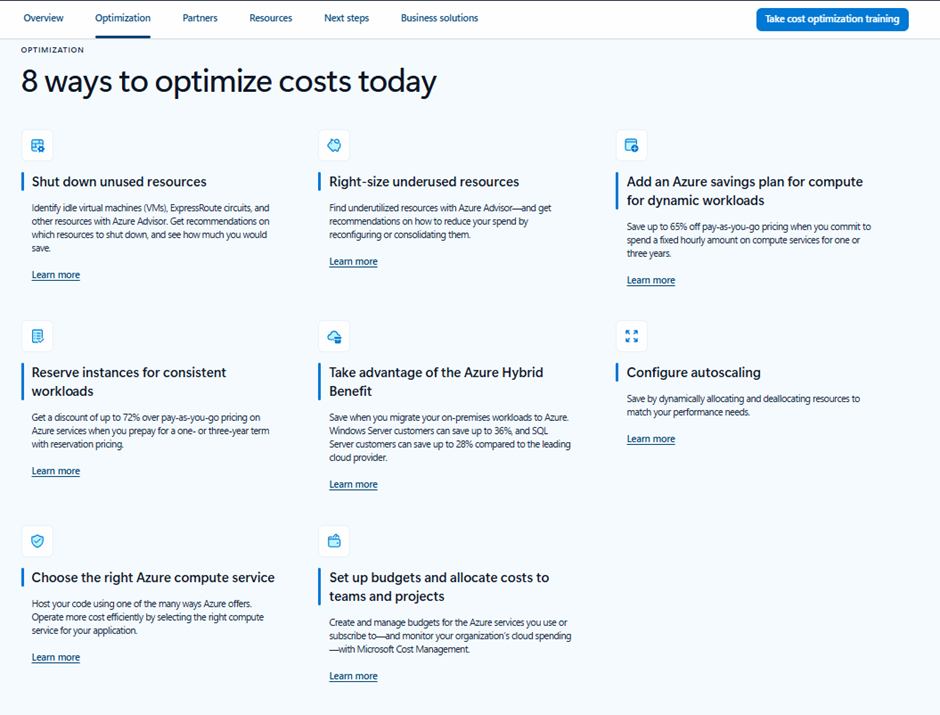
Keeping Azure Costs in Check Without Losing Your Mind
By now, we know Azure cost control is more of a structure problem than a spending issue. Putting a few practical systems in place can ensure Azure cost optimization becomes manageable instead of overwhelming.
Here’s how to keep it simple and sustainable:
- Make auditing a habit
Don’t wait for finance to flag a surprise bill. Review usage on a schedule that’s realistic for your business.
- Monthly reviews work well in businesses with stable environments.
- Weekly check-ins are better suited to fast-growing or high-usage setups.
The goal here is early detection because small cost leaks are easy to fix rather than large ones.
- Tag resources properly and consistently
When costs rise, you should instantly know who’s accountable. Every resource should clearly show:
- Owner
- Department or client
- Environment (Prod, Dev, Test)
- Purpose
- Set simple governance rules
As far as possible, keep things practical. Complicated frameworks rarely get followed, but clear guardrails actually work.
- Define budget thresholds.
- Require approvals for high-cost deployments.
- Enforce auto-shutdown policies for non-production environments.
- Review reserved instances and savings plans quarterly.
- Bring in expert support when needed
With Azure pricing, services, and best practices evolving constantly, getting help can be a smart resource management move. With proper support, MSPs and businesses receive structured monitoring, governance, and cost optimization strategies, along with visibility and control.
Take Control of Your Azure Environment
Partner with Infrassist to manage, optimize, and govern your Azure environment with confidence.
Conclusion
Azure is powerful, but without structure, it can become expensive. Overprovisioned resources, missed discounts, poor visibility, inefficient storage, lack of automation, and trying to manage everything internally are the usual culprits.
Azure cost optimization comes down to discipline. Audit regularly, tag properly, set simple governance rules, use the right pricing models, and automate where possible. Most importantly, treat cost management as an ongoing process rather than a one-time clean-up exercise.
If managing Azure feels heavier than it should, you don’t have to handle it alone. Infrassist Technologies Pvt. Ltd. supports MSPs and businesses with Azure migrations, ongoing management, monitoring, and optimization strategies that keep environments efficient and predictable.
If you want Azure to drive growth instead of surprise bills, it’s time to partner with a team that knows how to keep it under control.