If you strip away the laptops, the cloud apps, the firewalls, the servers, and all the shiny tech businesses rely on today, you’ll find one core system holding everything together: the network.
It moves data like veins move blood. And if that flow stops? The business comes to a grinding halt.
A recent industry report puts the cost of hourly network downtime at over $300,000 for 90% of firms, while 41% of enterprises say hourly downtime costs anywhere between $1 million and over $5 million.

And that’s not even the worst-case scenario.
This is why MSPs don’t get to treat network management like a side quest; it’s the main mission. When the network is up and running, every tool clients use feels fast, stable, and secure. But when it isn’t, suddenly the MSP becomes responsible for it all.
So, if you want networks that perform, scale, and don’t engender emergencies every other week, there are a few fundamentals you need to understand.
Eight Things about Network Management MSPs Should Be Aware Of
Let’s get into some key network management pillars that can help MSPs keep network operations under control to a great extent and enable quick incident response.
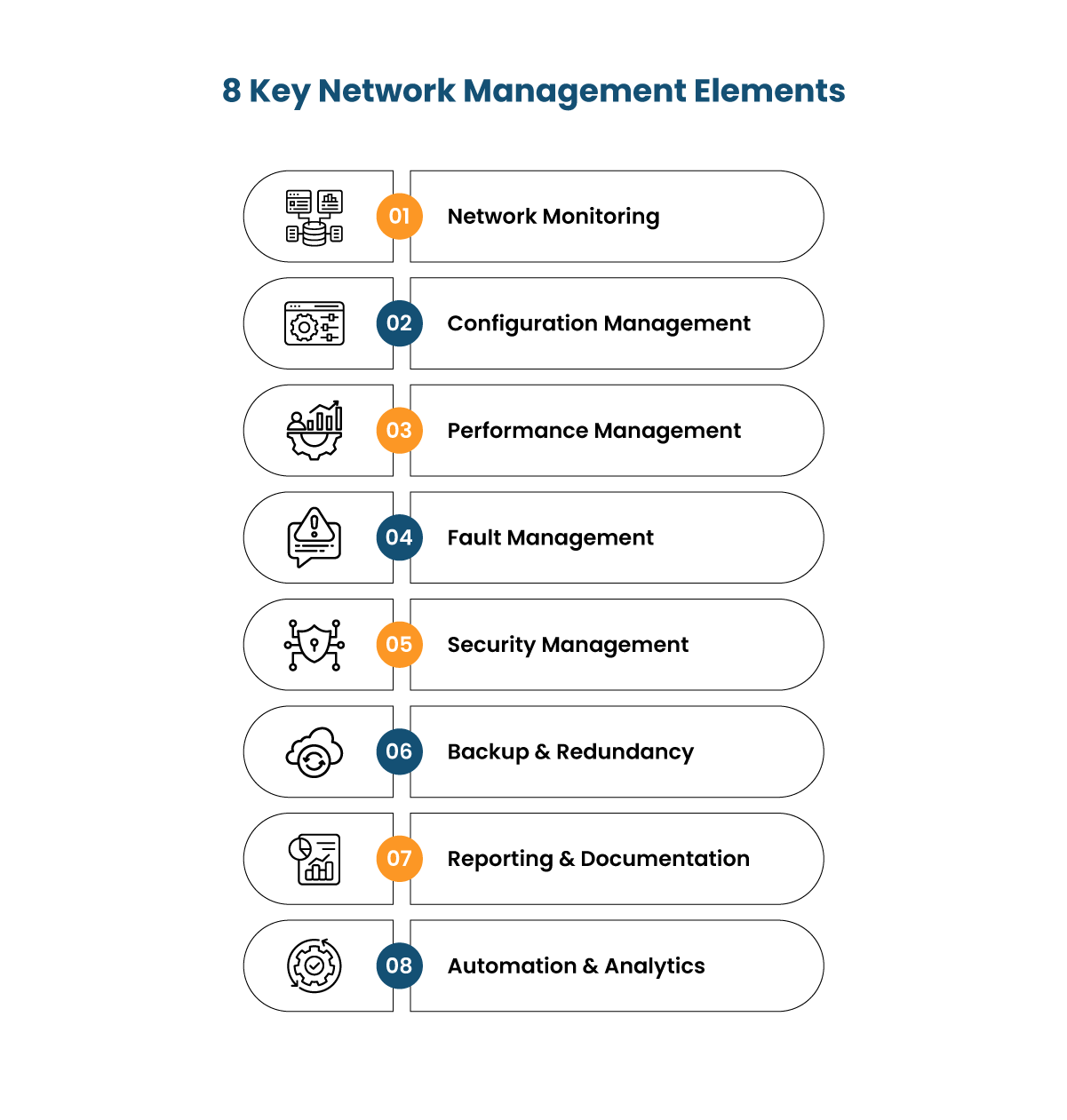
1. Network Monitoring
Think of network monitoring as the eyes and ears of the entire IT environment. Without it, you’re basically driving a bus blindfolded and hoping the passengers don’t scream.
Monitoring shows you what’s happening right now, from traffic flows and device health to latency issues and backup failures. With the right tools, you’ll also learn what’s about to become a problem.
Here’s where a lot of people misunderstand it. Monitoring isn’t just about catching outages. It’s also about spotting the telltale signs that operations are on the verge of encountering a glitch.
Maybe a switch is heating up, or bandwidth is quietly hitting limits during peak hours, or a specific app keeps devouring resources. Effective monitoring tools pick up on these patterns and notify you even before the effects become apparent.
Most importantly, it gives you evidence. When someone says “the internet is slow,” monitoring helps you respond with facts and figures. Logs and dashboards can show exactly what’s causing the slowdown — the ISP connection, a defunct device, a blockage, or any other factor.
Further, it empowers the MSPs to become proactive instead of reactive. If you’re only examining the network when tickets come in, you’re probably late. Monitoring is the difference between grappling with emergency situations at the last minute and mitigating risks before they become a threat in the first place.
2. Configuration Management
Networks are constantly changing with new upgrades, devices, security tweaks, software updates, and user accounts. Configuration management is what keeps everything on track in all of this chaos.
At its core, it’s about knowing:
- What is on the network
- How everything is configured
- Why, when, and who made each change
The simple fact is, networks don’t just break down by themselves. This usually happens when someone changes something, knowingly or otherwise. When you don’t track these changes, troubleshooting can feel like detective work.
With proper configuration management, however, you never have to guess. If an issue crops up, you can simply roll back to the previous working setup in minutes. Looking to expand your network? You’ve already got baseline templates. Even audits become faster and more accurate with the proper documentation in place.
In other words, configuration management keeps the network predictable and, hence, stable. And that’s exactly what MSPs do: provide networks that are stable, safe, and responsive.
3. Performance Management
With the kind of advanced technologies businesses work with today, a network being “up” is the bare minimum. What matters is whether or not it performs well and shows consistency.
Users don’t care that the router lights are blinking if their video call keeps freezing or their CRM takes 15 seconds to load every page. That’s why performance management exists: to make sure the network is working to its optimal capacity.
This means keeping tabs on bandwidth usage, latency, packet loss, and application responsiveness. If an operation slows down, you want to get to the root of it immediately and resolve bottlenecks before they hamper productivity.
Performance management isn’t just monitoring numbers; it’s also about analyzing and interpreting them. For example, if upload usage spikes at the same time every day, there is probably a scheduled task like backups competing with user activity. Similarly, if a new SaaS tool suddenly starts consuming most of the bandwidth, implementing QoS policies can keep essential services like voice calls running smoothly.
As such, you can observe patterns, adjust and allocate resources where needed, and fine-tune configurations so the network continues to support the business in the best possible ways.
4. Fault Management
Fault management involves catching the problem in the moment: the slowdown, the outage, the overall that created a loophole. But in real MSP life, fixing the technical fault is only half the story. That’s where incident management comes in.
Why? Because it’s all about deciding how the issue gets reported, who gets looped in, how fast it needs attention, and what the team learns once everything is back up and running.
When you connect fault management with incident management, the whole process feels smoother and more intentional. Instead of only putting out fires; you’re tracking what happened, communicating clearly, and making sure the same issue doesn’t circle back a month later.
Overall, it’s the difference between reacting and actually improving. For MSPs, pairing the two creates a calmer, more predictable way to handle disruptions, and clients feel that stability in their day-to-day work.
5. Security Management
In many ways, security is a foundational element of effective network management. Threats aren’t occasional anymore; they’re constant and always evolving. Hackers don’t care whether your client is a global bank or a local bakery. If there’s an internet connection, it automatically becomes a target.
Security management means adding multiple layers of protection that work in tandem. These include (but aren’t limited to) firewalls tuned properly, strong authentication, up-to-date firmware, vulnerability patching, encrypted traffic, and continuous monitoring for anything suspicious.
Clear access controls and well-defined security policies further minimize risks. Regular user awareness training is also essential, as human error remains a common point of entry for attacks.
Here’s what’s important: security is not a one-time initiative. It requires ongoing attention to ensure the network remains protected and aligned with current threat landscapes.
6. Backup and Redundancy
Backup and redundancy strategies keep network failures and downtime from becoming business-ending events.
Backups ensure critical data isn’t lost when the unexpected happens. The best setups include regular testing, multiple locations, and clear recovery procedures, all in a failsafe manner. You want recovery to be fast, predictable, and as stress-free as possible.
Redundancy supports backup initiatives by giving the network failover mechanisms. For instance, if one router or connection drops, a standby takes over. Or, if a switch goes offline, traffic reroutes automatically. The goal is to control damage quickly so users don’t even notice the anomaly.
When implemented correctly, these measures enable rapid recovery and maintain business continuity with minimal disruption to users.
7. Reporting and Documentation
Detailed documentation and accurate reporting of incidents are essential for maintaining network reliability and improving long-term performance.
Accurate reporting implies having a clear picture of network health over time. This can include uptime reports, bandwidth utilization trends, recurring alerts, and overall performance summaries. These are clues that reveal the system’s behavior over time.
For example, if the same switch shows errors every other week, you’re likely dealing with a deeper issue. Or, if the internet link saturates at 5 PM daily, maybe the client needs more bandwidth or QoS rules that can keep up with business traffic.
Incident documentation is equally critical. By recording incidents, configuration changes, and performance trends, MSPs gain valuable insight into system behavior over time. This allows them to identify recurring issues, perform root cause analysis, plan infrastructure improvements proactively, and streamline troubleshooting efforts.
Clients also appreciate transparency. When you show them clear reports that explain what you protect them from, it builds trust. Documentation turns every improvement, every prevented outage, every security enhancement into something they can see and value.
8. Automation and Analytics
Automation helps MSPs handle repetitive tasks efficiently and maintain consistent operational standards. Routine checks, patch schedules, configuration backups, and alerting are all perfect tasks for automation.
By letting software do the repetitive monitoring, IT teams can focus on high-impact improvements instead of constantly chasing noise.
Analytics works by dissecting patterns inside the data. For example, maybe a specific workload grows steadily every month and is about to hit a capacity wall. Analytics reflect this before it becomes a crisis.
Or, perhaps a sudden surge in outbound traffic indicates a malware issue. Analytics can help identify such threats before the damage mounts.
Moreover, predictive maintenance is now becoming the standard for modern network management. Instead of reacting when a device fails, analytics can flag when its performance is degrading. You can then replace/repair it during regular business hours instead of at midnight while users are locked out.
When automation and analytics work together, MSPs can scale their service quality without scaling stress. This means fewer surprises and faster responses, both of which are must-have factors for clients.
Conclusion
Network management doesn’t just mean keeping the lights on. It is a disciplined approach to stability, security, performance, and future-readiness.
When MSPs actively monitor the network, manage configurations carefully, optimize performance and security, and respond quickly to faults, the entire IT ecosystem becomes stronger. Users stay productive, outages become rare, and growth feels manageable.
It is a lot to handle alone, though. 24/7 NOC setups are capital-heavy and resource-intensive, and yet a significant part of an MSP’s service stack. That’s why many MSPs choose to partner with a 24/7 white label Managed IT and Professional Services provider like Infrassist. Our suite of services is strategically tailored to support MSPs in attaining service excellence and profitable growth. Get in touch with us today to learn more about how we can help your business stay secure, compliant, and steady.