How AI Is Reshaping MSP Operations
Every RMM and PSA vendor claims some kind of AI now, and the definition has gotten so loose it covers a chatbot bolted onto a ticket form and a genuine agent resolving issues on the endpoint layer with equal confidence. If you’re an MSP owner planning next year’s budget, you don’t need to know whether AI tools for MSPs exist. You need to know which ones cut technician hours and which ones just demo well.
Some tools genuinely cut down the daily grind of ticket triage, patching, and alert fatigue, while others still haven’t caught up to their own marketing. Pick wrong, and months of setup time later, you’ve got little to show for it. AI automation for MSPs works when it’s pointed at one measurable bottleneck. It doesn’t work when a competitor brings it up on a sales call and someone panics into a purchase.
What We Looked at Before Evaluating These Tools (Methodology + Criteria)
Feature count and marketing copy don’t tell an MSP much. So the tools below got judged against three questions instead.
- Does it integrate natively inside the PSA and RMM stack most MSPs already run? Or does it need a workaround?
- Is there a verifiable claim behind the outcome? A named analyst firm or the vendor’s own documented policy counts. An unsourced percentage on a slide doesn’t.
- Can a technician see what the AI did and undo it? Or is it a black box?
Real MSP AI automation looks like the first answer to those three questions. Worth drawing a line between AI vs automation for MSPs before going further. Automation does what a technician told it to do, following fixed rules someone wrote down. AI makes a judgment call based on patterns it picked up elsewhere. Mix the two up and you’ll end up disappointed in a tool that was, in fact, working exactly as designed.
AI Tools That Are Actually Saving MSPs Time
The tools here share one trait: they integrate natively into the systems MSPs already run, and their vendors are specific about what the tool does rather than vague about the outcome. That specificity separates real AI automation tools for MSP operations from a feature added mainly for the sales deck.
AI Ticket Triage & Service Desk Assistants

Most MSPs feel AI first in ticket volume. Since, it’s the most repetitive part of the job, this is where the payoff shows up fastest. ConnectWise Sidekick is a solid example of what AI ticket triage tools look like when done right. It reads ticket data straight out of ConnectWise PSA. No export step and no second login.
It handles categorization and summarization, suggests resolutions, drafts customer-facing replies, and flags negative sentiment before a ticket turns into an angry escalation call.
That’s usually what separates a tool technicians actually keep using from one quietly abandoned by week two: whether it lives inside the PSA or sits bolted on top of it. AI service desk tools for MSPs and AI helpdesk software overlap most right here, which matters for MSPs deciding between an AI layer bolted onto what they have and a dedicated help desk built for MSPs from the start.
AI-Driven RMM & Patch Automation

SuperOps didn’t bolt its AI layer on as an afterthought. Monica lives directly inside the unified PSA-RMM platform. It triages tickets using live endpoint context, writes PowerShell scripts from plain-language prompts, and turns ticket replies into formatted worklogs on its own. NinjaOne takes a different route. Machine learning does the heavy lifting across large endpoint fleets, cutting through routine alert noise so technicians see what actually needs attention instead of another scheduled patch spike. Both count as AI for RMM automation, worth weighing against whatever RMM automation your team already runs before adding another layer on top.
AI-Powered Security Monitoring & Alert Correlation

Guardz wasn’t built by shrinking an enterprise security tool down to SMB size. It was designed from the start for MSPs juggling multiple client environments from a single console. At the center of it is a unified security platform that pulls signals from identities, endpoints, email, and cloud into one view.
That matters when a suspicious login and a mailbox rule change happen on the same account. Instead of two separate alerts sitting on two separate dashboards, waiting for a technician to notice they’re connected, it shows up as one flagged event.
That’s the real test for any AI cybersecurity tools for MSP platform: does it correlate, or does it just add another dashboard to check? For MSPs weighing whether to formalize security into its own practice, this connects directly to the transition from being an MSP to an MSSP.
Agentic Automation & Hyper-automation

Rewst and Atera sit at the more ambitious end of agentic AI for MSPs. Gartner has a name for a common failure mode here: “agentwashing,” labeling an assistive tool an “agent” when it only suggests actions instead of executing them.
Rewst avoids that trap by being upfront about what it is: a rules-based automation platform. Every workflow has to be explicitly built before it runs. Once it’s built, it runs the same way every time, though keeping it running still takes real, ongoing effort worth budgeting for.
Atera’s Robin goes further. It’s an autonomous agent designed to resolve incidents end to end, rather than follow a pre-built script. That claim comes backed by a public 90-day performance guarantee: Atera commits to resolving 50% of Tier 1 and complex Tier 2 tickets, or it waives the fees. That’s a rare written commitment, and a useful signal when evaluating any AI copilot for MSPs.
Accelerate Your MSP Automation with Rewst
Don’t spend hundreds of hours building workflows from ground up. Our Managed Automation Pilot Program gives you turn-key automations for user onboarding/offboarding, M365 management, and core MSP operations.
Download Free Managed Automation Program PDF
AI Tools That Sound Good But Aren’t Delivering ROI Yet
Not every category is there yet. Most AI tools that disappoint MSPs fall into four familiar categories.
- Standalone AI documentation generators get marketed as the fix for stale runbooks. In practice, they become one more tool a technician has to remember to open, instead of living inside the ticketing or RMM workflow where the work already happens.
- Client-facing AI chatbots get sold as a new revenue line. They’re easy to demo. Billing for them is another story, the client conversation rarely goes the way the sales deck promised it would.
- General-purpose copilots repurposed for MSP operations are genuinely useful for drafting and summarizing. What they can’t do is touch ticket routing, billing, or alert triage, not without native PSA or RMM integration, which most of them don’t have. Microsoft’s own AI layer runs on a different playbook entirely, from licensing to rollout, detailed in Microsoft 365 Copilot implementation.
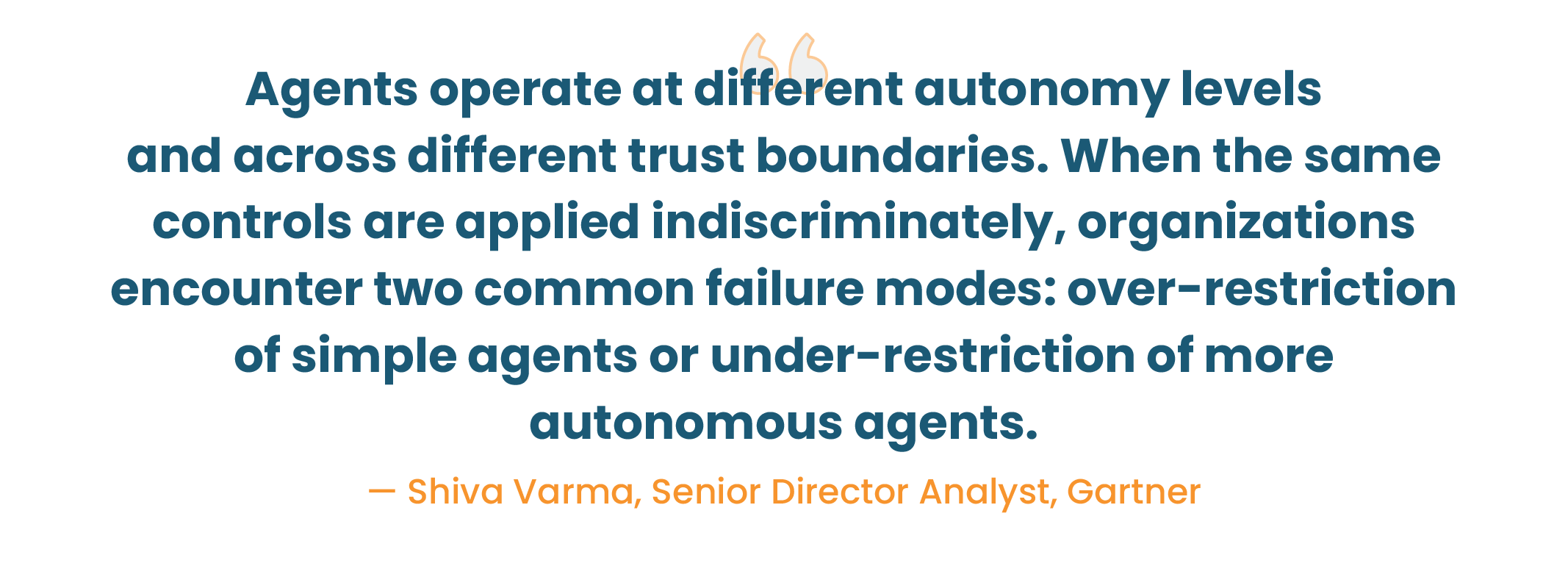
- “Replace your Tier 1 team” pitches sold without governance controls, worth taking most seriously. Gartner predicts that by 2027, 40% of enterprises will demote or decommission autonomous AI agents if governance gaps surface after a production incident. Selling full autonomy without a clear answer on approvals, logging, and rollback is selling the failure mode Gartner describes.
None of that is a reason to avoid AI, just to be specific about what a tool actually solves before signing, the same logic behind picking any other piece of your MSP tool stack.
Time-Saving AI Tools vs. Overhyped AI Tools (At a Glance)
| Tool / Category | What It Actually Does |
Verdict |
| ConnectWise Sidekick | Native ticket triage, summarization, and categorization inside ConnectWise PSA | Actually saving time |
| SuperOps (Monica) | Agentic ticket triage, script generation, and automated worklogs | Actually saving time |
| NinjaOne | ML-based alert noise reduction across large endpoint fleets | Actually saving time |
| Guardz | Correlated threat detection across identity, endpoint, email, cloud | Actually saving time |
| Rewst | Rules-based hyperautomation; requires a dedicated workflow builder | Works, but budget the labor |
| Atera (Robin) | Autonomous ticket resolution, backed by a public 90-day guarantee | Actually saving time |
| Standalone documentation generators | AI-written knowledge base articles and SOPs | Overhyped |
| Client-facing chatbots | Pitched as a new revenue line; hard to bill for | Overhyped |
| General-purpose copilots | Drafting and summarizing without PSA/RMM integration | Overhyped for ops use |
| “Fully autonomous” L1 replacement pitches | Marketed as headcount replacement without governance controls | Overhyped, per Gartner’s governance-failure forecast |
Tool Category Breakdown
Not every MSP needs the same category first. The table below breaks down where each of these AI-driven MSP tools fits and what it costs to run, which matters more than which vendor claims to be the best AI tools for MSPs on a comparison chart.
| Category | Example Tools | Pricing Model |
Best Fit |
| AI ticket triage & service desk | ConnectWise Sidekick | Bundled with PSA | MSPs already on ConnectWise |
| AI-driven RMM & patch automation | SuperOps (Monica), NinjaOne | Per technician or per endpoint | MSPs standardizing their stack |
| AI security monitoring | Guardz | Per user/client, tiered | MSPs scaling a security practice |
| Agentic automation & hyperautomation | Rewst, Atera (Robin) | Custom quote (Rewst); per technician (Atera) | MSPs with automation capacity or high ticket volume |
How to Tell the Difference Before You Buy
Getting AI tools for MSP business decisions right, instead of repeating the AI automation mistakes MSPs make, comes down to four questions worth asking before you sign:
- Does the vendor put a specific commitment in writing, the way Atera does, instead of a vague productivity claim?
- Does the AI read and write natively inside your PSA or RMM, with no manual export step?
- Is every automated action logged and reversible, so a technician can see and undo it?
- Does “replace your Tier 1 team” language mention governance or an audit trail, or is that gap glossed over?
Real Time-Savings MSPs Are Reporting in 2026 (Benchmarks)
Most time-savings numbers floating around the MSP space come straight from the vendors selling the tools. Worth verifying in your own environment before repeating any of them to a client.
Gartner is the independently verifiable trend line here, tracking this shift at the broader IT infrastructure level rather than the MSP niche specifically. Its numbers: task-specific AI agents will sit in 40% of enterprise applications by 2026, up from under 5% in 2025.
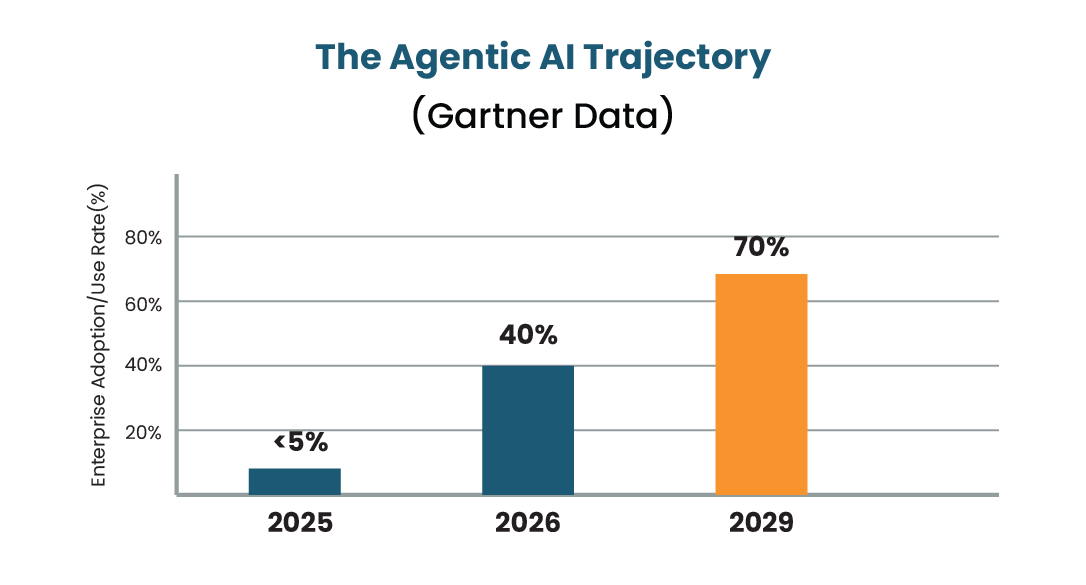
Its December 2025 Predicts report goes further, projecting that 70% of enterprises will lean on agentic AI to help run IT infrastructure by 2029. That trajectory matters for MSP AI use cases 2026 planning, whether or not any single vendor’s own claim has been independently verified. Here’s the honest read on MSP artificial intelligence adoption right now: broad, not deep. Most vendors ship some kind of AI feature. Very few have actually proven full-workflow autonomy.
How to Roll Out AI Tools Without Disrupting Your Team
- Start with one bottleneck, not a platform switch: the workflow costing the most technician hours, usually ticket triage, piloted with one tool first.
- Set a usage cap and governance policy before go-live, confirmed in writing: what the tool can do without sign-off, and what always needs a technician’s review.
- Train AI tools for technicians on review, not blind trust. Every AI-generated script or resolution should get a technician review for the first 60 to 90 days.
- Measure before and after with your own numbers: ticket resolution time and technician hours, 30 days before rollout and 30 after, so the renewal case rests on your data, not a vendor’s.
Getting AI for MSP ticketing automation right the first time gives you a proof point. Use it to make the case for automation for MSPs elsewhere in the business, to a technician team that’s otherwise skeptical of anything new.
Not Sure Which AI Tools Are Worth It for Your MSP?
Infrassist works with MSPs every day to separate genuine automation gains from vendor hype, so you invest where it actually counts.
Final Thoughts
Longest tool list doesn’t win in 2026. The MSPs seeing real returns picked one bottleneck, found a tool that plugged into what they already run, and measured the result before adding anything else.
Everyone else is still catching up to their own marketing. Gartner’s governance research backs that up: the gap between the pitch and the product isn’t a branding problem. It’s structural.