A branch office loses its primary circuit at midnight and nobody notices until a user calls in at 8 AM. That gap is the difference between SD-WAN that’s monitored and SD-WAN that just runs. Rolling it out is the easy half. Watching it, with real SD-WAN best practices behind it, is what separates MSPs who catch problems early from ones who find out from the client. A well-run SD-WAN NOC shows up in three numbers. Uptime holds. Application performance holds. The client’s phone stops ringing with complaints.
Most MSPs didn’t set out to become SD-WAN specialists. Clients rolled the technology out on their own schedule, sometimes through a hardware vendor, sometimes through whichever integrator happened to be in the building that quarter, and the MSP inherited whatever was already running. A satellite office on LTE backup gets watched the same way as a fiber headquarters. A brownout gets written off as noise until it repeats three times in a week. None of that ever shows up in a sales pitch because it tends to show up months later, when a client asks why the SD-WAN spend hasn’t translated into fewer complaints on the ticket queue.
What Is SD-WAN Monitoring, and How Is It Different From SD-WAN Management?
SD-WAN monitoring. Picture a NOC dashboard mid-shift: link health across a dozen sites, application performance per circuit, path selection updating in real time. That live feed is the job. Which circuit just degraded. Which application is losing packets. Which site needs eyes first.
SD-WAN management is a different job, even though the two get lumped together constantly. It lives on the configuration side: policies, routing rules, new site provisioning, firmware pushes. Monitoring tells you what’s happening out there and management helps determine what happens next.
A lot of managed SD-WAN services bundle both into one subscription. That works fine until the monitoring data underneath is thin. Then management decisions look reasonable on paper and fall apart the moment real traffic hits them.
None of these matters to the client in technical terms. What they notice is simpler: fewer escalations landing on their desk during business hours. Application performance holding steady even when an underlay link degrades.
Uptime figures an MSP can back up with data instead of a promise. Providers running full NOC services for MSPs tend to fold SD-WAN health into the same monitoring stack used for the rest of a client’s infrastructure, so a WAN problem doesn’t sit unnoticed in its own separate dashboard.
SD-WAN Monitoring Best Practices Every NOC Team Should Follow
There’s no single setting that fixes this. A handful of habits, though, separate NOCs that catch problems early from NOCs that find out from the client. The difference usually comes down to what the NOC watches, how quickly it connects the dots, and whether someone actually owns the response.
- Overlay and underlay need separate visibility. The overlay is the virtual fabric; the underlay is the physical broadband, MPLS, or LTE circuit underneath it. A healthy-looking overlay can hide an underlay circuit that’s quietly failing.
- Watch application-aware routing, not just uptime. A link can stay up while one specific application, a VoIP platform is a typical example, keeps losing packets because traffic isn’t being steered down the healthy path.
- Per-site thresholds beat one global number every time. A satellite office running on cellular backup doesn’t tolerate the same latency a fiber-connected headquarters does.
- Correlate telemetry across every vendor in play. Multi-vendor monitoring works only when the data lands somewhere the on-shift engineer can read mid-incident, not spread across five separate logins.
- Brownouts deserve alerts too, not only full outages. Most SD-WAN failures show up first as partial degradation, and a NOC that waits for a hard down misses most of what the end user feels.
- Escalation paths need MTTR and MTTA targets attached. Otherwise response time depends on who happens to be on shift that night, which isn’t a real number to report on.
Managing Multi-Vendor SD-WAN Environments and Tools
Most MSPs end up supporting more than one SD-WAN platform across their client base, whether by design or because each new client walked in already running something different:
- Cisco, through Viptela and Meraki, tends to show up wherever a client has already standardized its networking gear around Cisco.
- Fortinet Secure SD-WAN usually arrives paired with FortiGate firewalls, for clients who’d rather buy networking and security from one vendor.
- VMware VeloCloud is common in accounts that adopted it a few product cycles back and never had a reason to move off it.
- Meraki wins over clients who want a simpler, cloud-managed interface more than granular control.
- Versa Networks shows up more often in service-provider-delivered projects than in direct enterprise purchases.
That mix creates real friction for a NOC engineer switching between five interfaces mid-incident. More often than not, the actual problem isn’t the tools themselves. It’s that no two vendors define the same metric the same way.
It’s 2 AM and three circuits look shaky across three different vendor dashboards. That’s the moment vendor-native tools, Cisco vManage, FortiManager, VMware Orchestrator, Meraki, Versa Director, show their limits. Each covers its own platform well and none of them communicate with each other. Flow-based platforms ingesting NetFlow or IPFIX close that gap, catching underlay congestion before a user ever notices. For anyone running more than one SD-WAN vendor, a third-party overlay platform built for multi-vendor monitoring earns its cost within the first bad night. One screen, not five, is what the on-shift engineer wants most.
The whole setup still depends on consistent metric definitions behind it. Standardizing how NOC KPIs for MSPs are defined and reported keeps a multi-vendor environment from turning into five separate reporting standards under one roof.
As security and networking converge, vendor spending trends reflect a sharp shift toward integrated protection. As the graphic below from Gartner illustrates, demand for cloud-delivered security is rapidly pacing traditional SD-WAN growth.
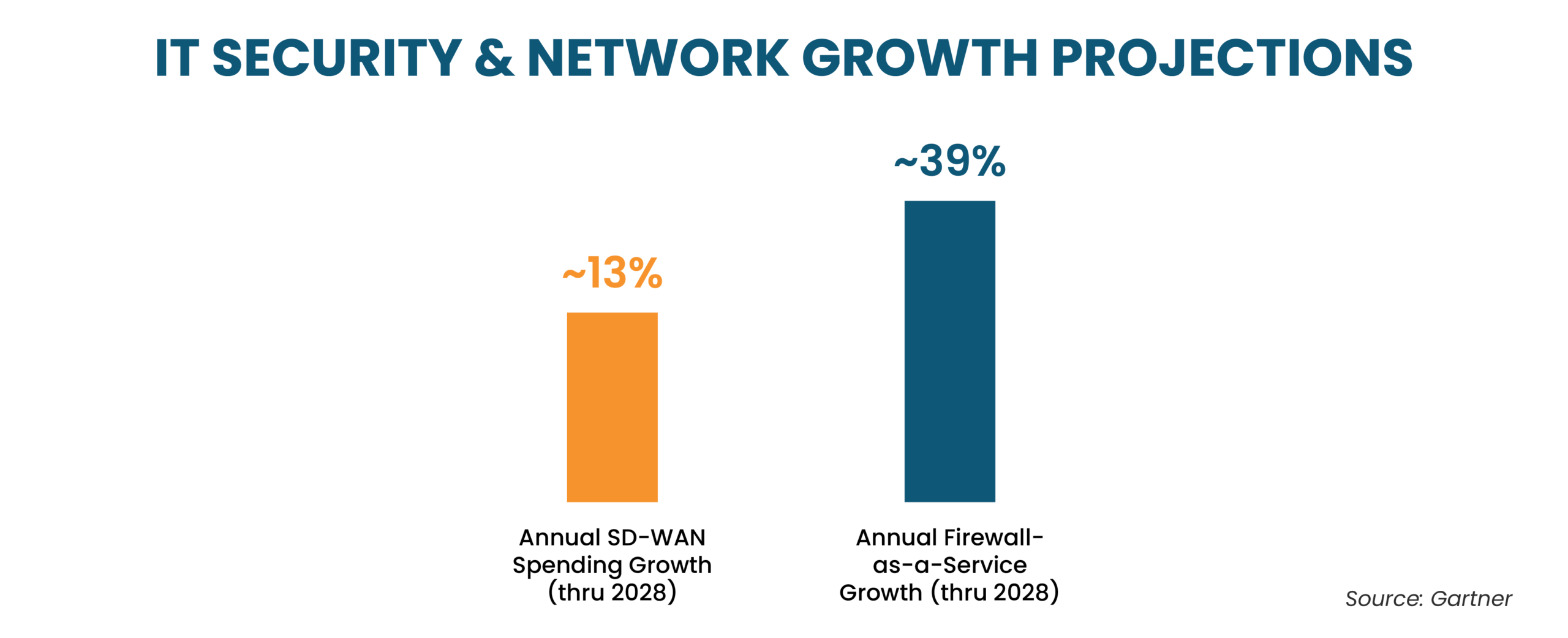
Source: Gartner
SD-WAN Security Best Practices for NOC Teams
SD-WAN isn’t automatically more secure than a traditional WAN. More paths means more surface area, not less. A branch site running broadband, LTE, and a wired backup gives an attacker three points to probe instead of one, and each of those paths needs its own encryption, not a blanket assumption that the overlay handles it. Retail and healthcare accounts raise the stakes further. Point-of-sale terminals and patient records frequently share the same links as ordinary browsing traffic. A breach in one segment rarely stays contained to that segment alone.
These five SD-WAN security best practices come up in nearly every review:
- Encrypt every overlay tunnel with IPsec or TLS instead of leaning on the transport link’s own security.
- Segment traffic by application or tenant, so one compromised segment can’t move laterally across the rest of the fabric.
- Zero Trust Architecture principles applied to branch-to-cloud traffic beat assuming anything inside the overlay is automatically trustworthy.
- Centralize policy enforcement. Separate firewall rules at every site drift out of sync fast, and nobody notices until an audit turns it up.
- Set a strict cadence for firmware updates during regular maintenance windows. If you wait for a flaw to hit breaking news before patching, you’re leaving a wide-open window for bad actors to get in.
SD-WAN Troubleshooting: How a NOC Handles the Common Failures
Half the battle in SD-WAN troubleshooting is just deciding whether an alert is worth chasing, right? Chasing every brownout wastes engineer time. Ignoring real patterns leaves the client waiting.
| Common Issue | Likely Cause | NOC Response | Metric Tracked |
| Intermittent packet loss on one path | Congested underlay circuit or carrier-side fault | Reroute traffic, open a ticket with the carrier | Packet loss %, MTTR |
| Application slowness despite healthy uptime | Misconfigured application-aware routing policy | Review the routing policy against actual traffic | Application response time |
| Frequent brownouts without a full outage | Underlay link flapping below the alert threshold | Tighten thresholds, correlate flow data | MTTA |
| Site unreachable after failover | Backup circuit not provisioned correctly | Validate failover configuration at onboarding | Uptime % |
| High jitter on voice or video traffic | Insufficient QoS prioritization | Re-tier traffic classes, adjust queuing | Jitter, packet loss |
While catching degradation early protects your budget, the true financial impact of downtime mounts rapidly minute by minute. As the graphic below from Forbes illustrates, proactive monitoring fundamentally shifts how those operational costs are managed:

Source: Forbes
Spotting performance drops early during the packet-loss phase helps safeguard a client’s bottom line just as much as it preserves uptime. What matters most here is repetition. A isolated brownout rarely depicts the whole story; however, when one site repeatedly flags issues across a few days, you are looking at a failing circuit that needs to be replaced, not just watched.
Can MSPs Offer 24/7 SD-WAN Support Without an In-House NOC?
Yes. Most already do. Three shifts of engineers, each fluent in five or six vendor platforms, that’s what a 24/7 SD-WAN NOC costs to staff in-house, and most MSPs don’t have the ticket volume to justify it. SD-WAN for MSPs doesn’t have to mean building that expertise from scratch.
White-label NOC support that includes SD-WAN monitoring flips that math. Round-the-clock coverage sits under the MSP’s own brand while a specialized partner runs the technical monitoring and troubleshooting behind it, never in front of it.
Outsourced SD-WAN monitoring works well because SD-WAN issues rarely respect business hours. A branch office in a different time zone doesn’t wait until 9 AM to lose a circuit, and the same reasoning behind in-house NOC vs outsourced NOC for MSPs holds true for SD-WAN as well.
Not every NOC partner covers SD-WAN at the same depth. A partner who’s only ever managed one vendor’s platform tends to struggle the moment a client’s environment includes two or three. Before signing anything, a few things are worth checking:
- Multi-vendor experience across the platforms already in the client’s environment, not just the ones the partner prefers to sell.
- Documented MTTR and MTTA numbers from past engagements carry more weight than a general claim of fast response.
- Separated overlay and underlay reporting, instead of one blended uptime number that hides which layer is causing the problem.
- Escalation paths defined before onboarding, covering who gets contacted and how quickly, for business hours and overnight incidents alike.
- Managed SD-WAN services that include security telemetry, not just connectivity metrics, given how closely the two are converging.
A partner already delivering outsourced NOC support services across a client’s full stack usually catches SD-WAN issues faster than one bolted on as a standalone add-on. Same engineers, same context on the rest of the environment already.