About Customer
Validassess (VA)* is a leader in jewellery validation and claim assessment & their values lie in giving independent advice to customer as well as insurers. They do assessment, settlement, give recommendations and advice for insurance claims. As the single point of contact, VA is bridging the ever-growing complexity between the insurance and the jewellery industry.
Overview
Currently VA* is using Microsoft 365 for their email & office apps. All devices are joined to Azure Active Directory with on-premises AD in place. They have got a managed service contract locally and all their N-Central RMM agents are deployed to workstation primarily for any OS updates.
Our valued MSP Partner from Australia has engaged us, Infrassist Technologies Pvt. Ltd. to provide professional services to their end customer, VA*. They wanted our help in the implementation of a host of services such as Microsoft Endpoint Manager, Intune for O.S. updates (for mobile devices only), Application installation, Device configuration profiles & Endpoint security, PowerShell script to remove all users from local administrator group and set as a standard user, Compliance policies, Conditional access policies etc.
The key configurations targeting to pilot group were initially followed by all users across an organization. The initial pilot group of users’ devices will be configured using different Intune MDM policies as mentioned above.
Solution
As part of this project deployment at VA*, all users’ Windows 10 devices will be enrolled to Microsoft Intune MDM Solution as shown in below component level architectural diagram.
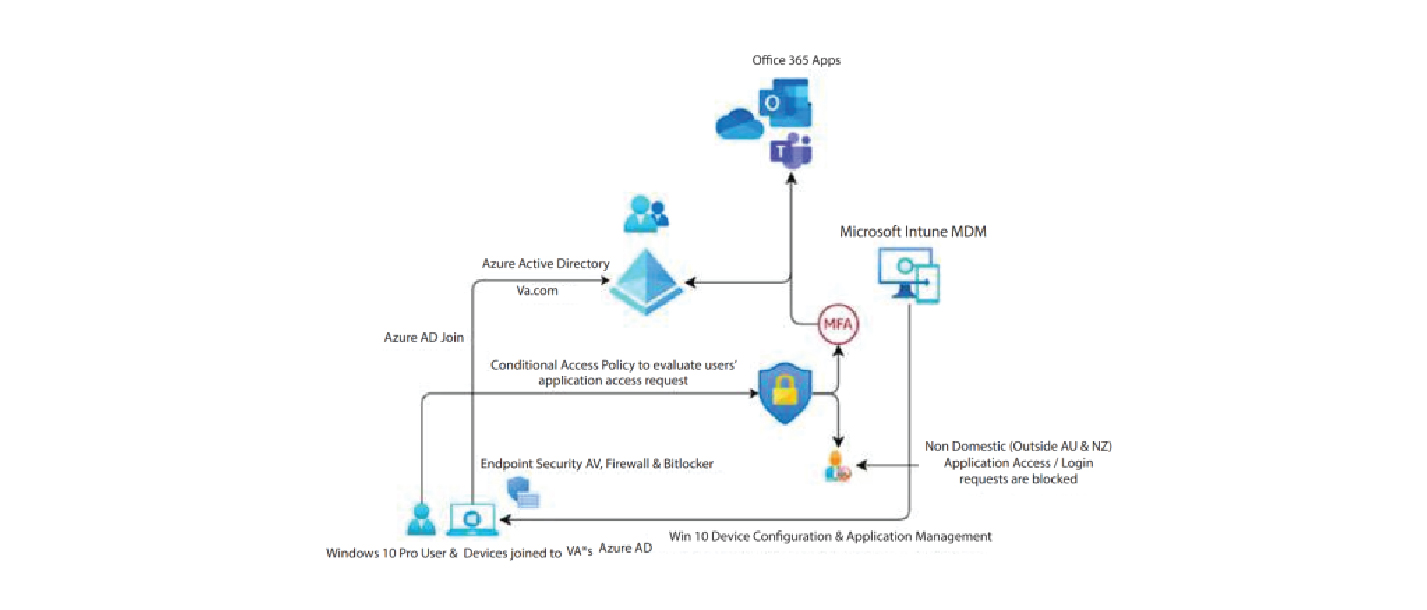
- As part of this, all device configuration & application management will be performed by Microsoft Intune device configuration & application deployment policies.
- Users’ login and/or all applications’ access request will be evaluated by Azure Active Directory Conditional Access Module first & based on origin location of session request appropriate action will be taken as agreed during design workshop.
- All non-domestic application access requests (outside Australia & New Zealand) will be blocked. Whereas legitimate users need to perform an additional layer of Authentication as an additional layer of security before they are granted access to the requested resource.
- All endpoint security related features including Antivirus, Firewall & Drive encryption related checks will be performed by means of Intune Compliance Policy with appropriate actions for non-compliant users’ devices.
Technologies Used

Accomplishment
All corporate owned Windows 10 devices were enrollment to Microsoft Intune MDM Solution & required Security Policies, apps, device configuration profiles were pushed to all of them for centralized management from unified Microsoft Endpoint Manager (MEM) Portal.