Migrating the RMM (remote monitoring and management platform) is disruptive for any MSP. What’s worse is that many teams end up switching platforms sooner than planned because of rising costs, limited automation, poor integrations, unreliable support, or scalability issues that start affecting day-to-day operations.
You could have many reasons for switching the RMM: the support quality declined after ownership changes, pricing increased faster than contract terms allow, or critical limitations slowed down technicians, created operational gaps, and made it harder to scale client environments efficiently. However, ultimately, it boils down to: how can you make the switch seamless and set the right ITSM base for efficient service delivery going forward?
This guide will walk you through the following:
- What drives RMM migrations?
- What factors must you assess before committing?
- How should you structure the migration?
Besides, you will also find the common pitfalls when performing the RMM migration.
Let’s get started.
Why MSPs Are Considering RMM Migrations
Typically, managed service providers (MSPs) put off RMM migrations for as long as possible because the process impacts every layer of service delivery. But when technicians start wasting time on unstable automations, patching gaps, or poor integrations, the operational cost of staying on the current platform becomes harder to justify than the risk of migrating.
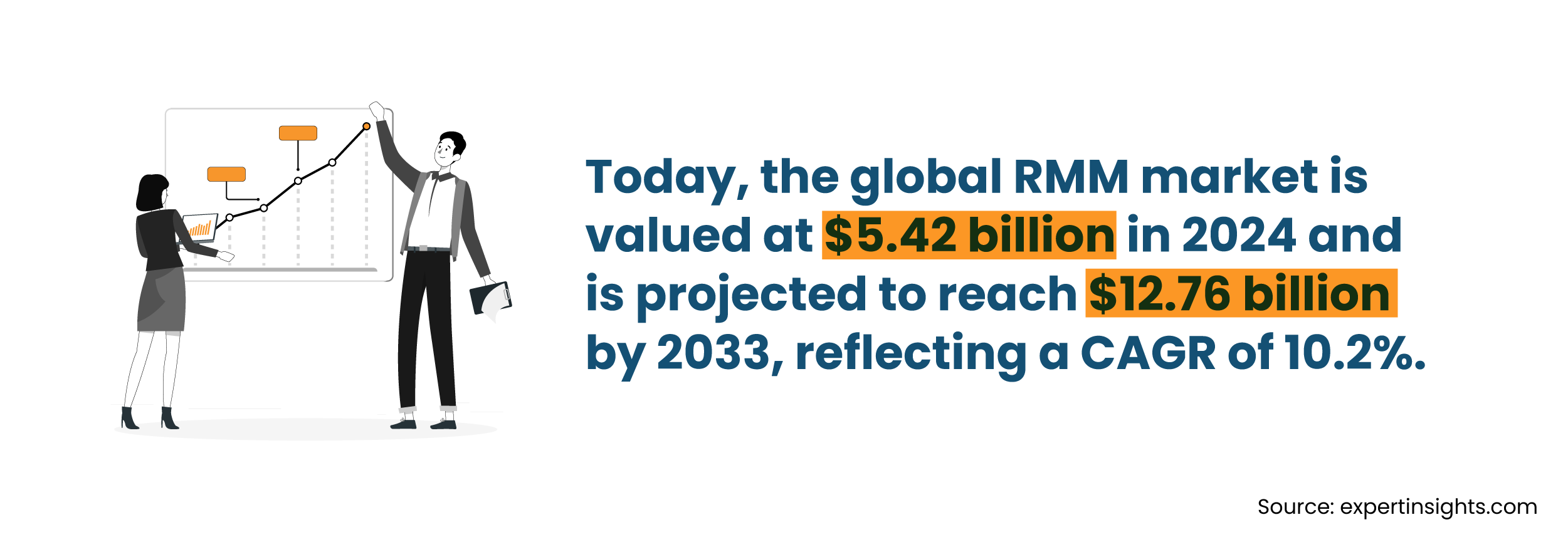
Here are the top factors driving this market:
1. The Cost Exceeds the Benefit
Over the past few years, many MSPs have seen RMM pricing become harder to justify as licensing costs, mandatory add-ons, and endpoint-based pricing continue to increase alongside business growth. What starts as a cost-effective platform for a smaller MSP often becomes significantly more expensive at scale, especially when the tool still requires heavy manual workarounds or lacks the flexibility needed for evolving client environments.
Many MSPs report paying exorbitant renewal prices and per-module charges to gain access to features that were previously bundled. This includes features like patch management, remote access, reporting, and more.
2. Weak Automation Leading to Manual Workarounds
When technicians cannot rely on automation, they resort to doing things manually. This not only takes more time but also increases the probability of errors and increases the operational costs.
Many times, teams are not aware of the amount of manual rework they have been doing until they make the RMM switch.
Automation is central to efficiency, more than teams realize: 76% of MSPs in an MSP Success survey cited automation as directly driving efficiency gains, and 66% called it essential to scaling their business. When the RMM is undermining that, the cost is felt across the entire operation.
3. Poor Integration Capabilities
Poor integration with the rest of the tool stack, like the PSA (Professional Services Automation), security stack, or documentation platform, causes friction throughout the entire process. A disconnected system attracts issues like duplicate data entries, delayed ticket creation, missed alerts, and more.
4. Scalability Issues
As MSPs grow, the real issue becomes whether the platform can keep operations manageable as client environments, technician workloads, and automation requirements become more complex.
Teams begin dealing with endless alert noise, patching policies that behave differently across client environments, and PSA integrations that need manual cleanup. Dashboards become crowded, ticket queues harder to prioritize, and managing separate policies across multiple tenants turn increasingly messy.
Common pain points usually include:
- Alert fatigue from poorly tuned monitoring policies
- Patch management inconsistencies across clients and device groups
- PSA sync issues that create duplicate tickets or gaps in workflows
- Limited visibility across multiple client environments
- Confusing dashboards and overloaded technician queues
- Automation that requires constant scripting adjustments and maintenance
- Reporting limitations that make SLA tracking and client reviews harder
At a certain point, the platform stops feeling like a growth enabler and starts becoming another operational layer the MSP has to work around every day.
5. Security Concerns
RMM platforms have privileged access to every client’s network environment. So, when a vendor’s security posture isn’t as per the standard or an acquisition points to data-handling issues, it will trigger a review of the vendor’s toolset.
Knowing the root cause of the concern is critical. If a platform is underperforming on automation, it can respond more to targeted configuration changes versus a full replacement.
Consider these factors before moving forward with an RMM migration.
What to Evaluate Before Committing
The evaluation phase of a migration determines the success of the process. The most common error that MSPs make during this phase is to rush through the evaluation phase.
Consider each of the pointers shared to lay a strong foundation for your RMM migration.
1. Audit the Existing RMM Environment
Before evaluating a new platform, begin by auditing your current RMM environment and creating a complete list of everything you currently utilize on your existing platform.
During this phase, most MSPs will find many things that need to be fixed before they move to a different platform. For instance, MSPs often find they have outdated scripts, monitors that are no longer in use, or policies that do not match from one system to another.
This does not mean your migration is delayed; it means you must take the time to clean them up before migrating to avoid carrying them forward.
Here’s what you must document across your current environment to ensure a smooth migration:
- All active monitoring policies and alert thresholds
- Scripts and automation workflows that are active in production
- Integrations for PSA, backup, antivirus (AV), and documentation solutions
- Client-specific configurations and service level agreements (SLAs)
- Custom reports and dashboards
Having a clean and documented environment is crucial for a successful and easy migration. It will also minimize unnecessary configuration when moving into the new platform.
2. Examine Integrations and Application Compatibility
Map every integration connected to your current RMM and evaluate how those workflows will function in the new platform. This includes PSA integrations, backup tools, security platforms, documentation systems, patching workflows, reporting tools, and any custom automations your technicians rely on daily.
More importantly, verify whether the integration will:
- Work reliably out of the box with full feature support
- Support only partial functionality, requiring manual workarounds
- Depend on API scripting or custom automation to maintain existing workflows
- Introduce syncing limitations, delayed ticket creation, or policy inconsistencies
- Fail to support certain client environments, device types, or automation tasks altogether
3. Establish Migration Success Criteria
Before an agent is deployed on the platform, decide on what a successful migration looks like. This will prevent your project scope from drifting and keep the team focused on achieving mutually-agreed objectives.
Some options to include in your definition include:
- SLA compliance throughout the migration
- Zero client-facing degradation of service during the cutover
- All workflows were validated before the decommissioning of the old platform
- Technicians are trained and can operate independently on the new platform within the decided timeframe
4. Budget for Real Costs
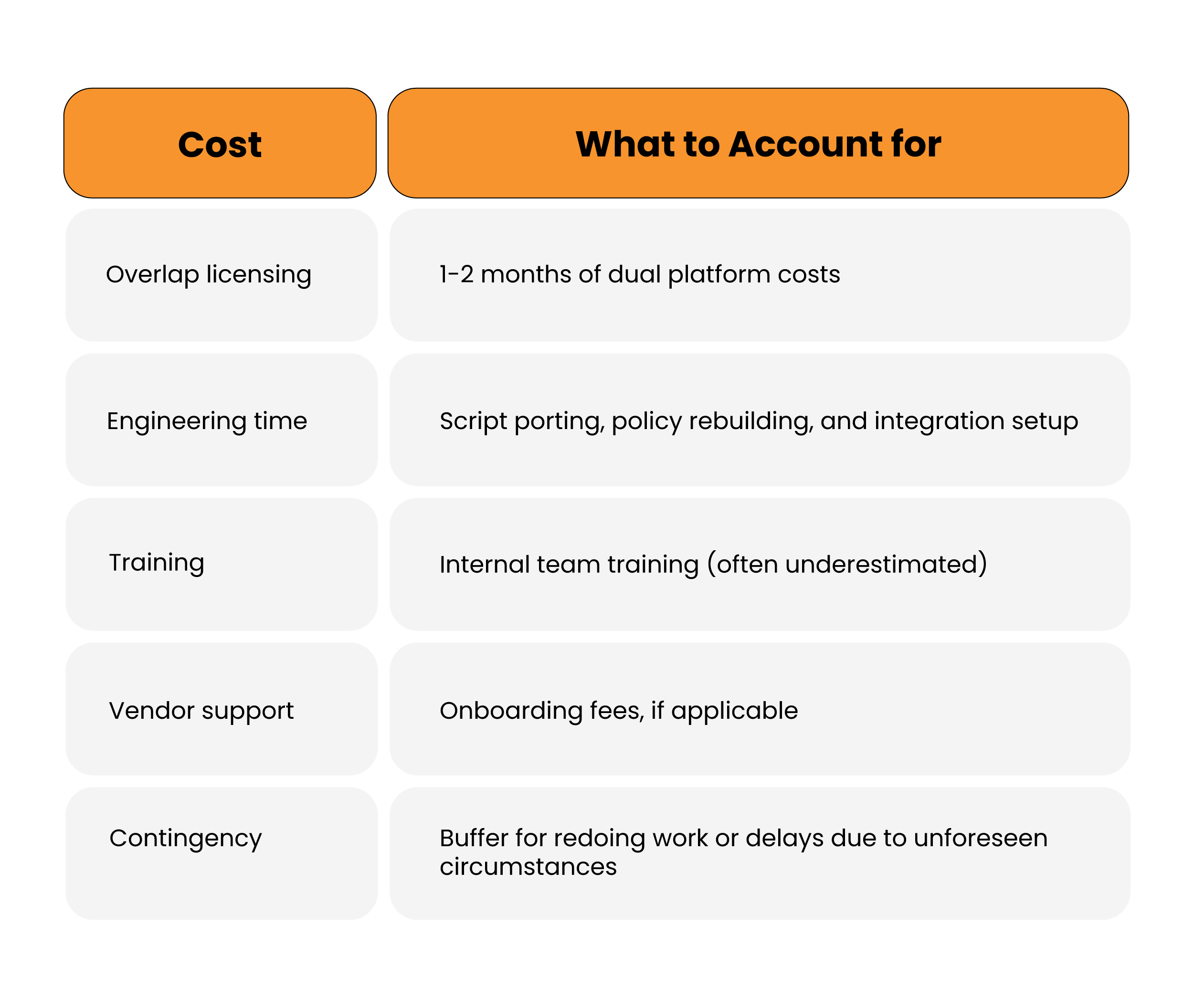
RMM migration costs are more than just the new licensing costs. During the overlap period (1-2 months), both platforms incur costs; teams end up paying for both products during this time.
Further, account for the significant engineering time required for script rebuilding and workflow rebuilding. And technician training also takes time away from billable work, even for an intuitive platform.
This table summarizes clearly what teams should expect.
Structuring the 4 Phases of RMM Migration
Rolling out in phases with a controlled and managed approach outperforms a full cutover 100% of the time. The premise is simple: Validate before you scale.
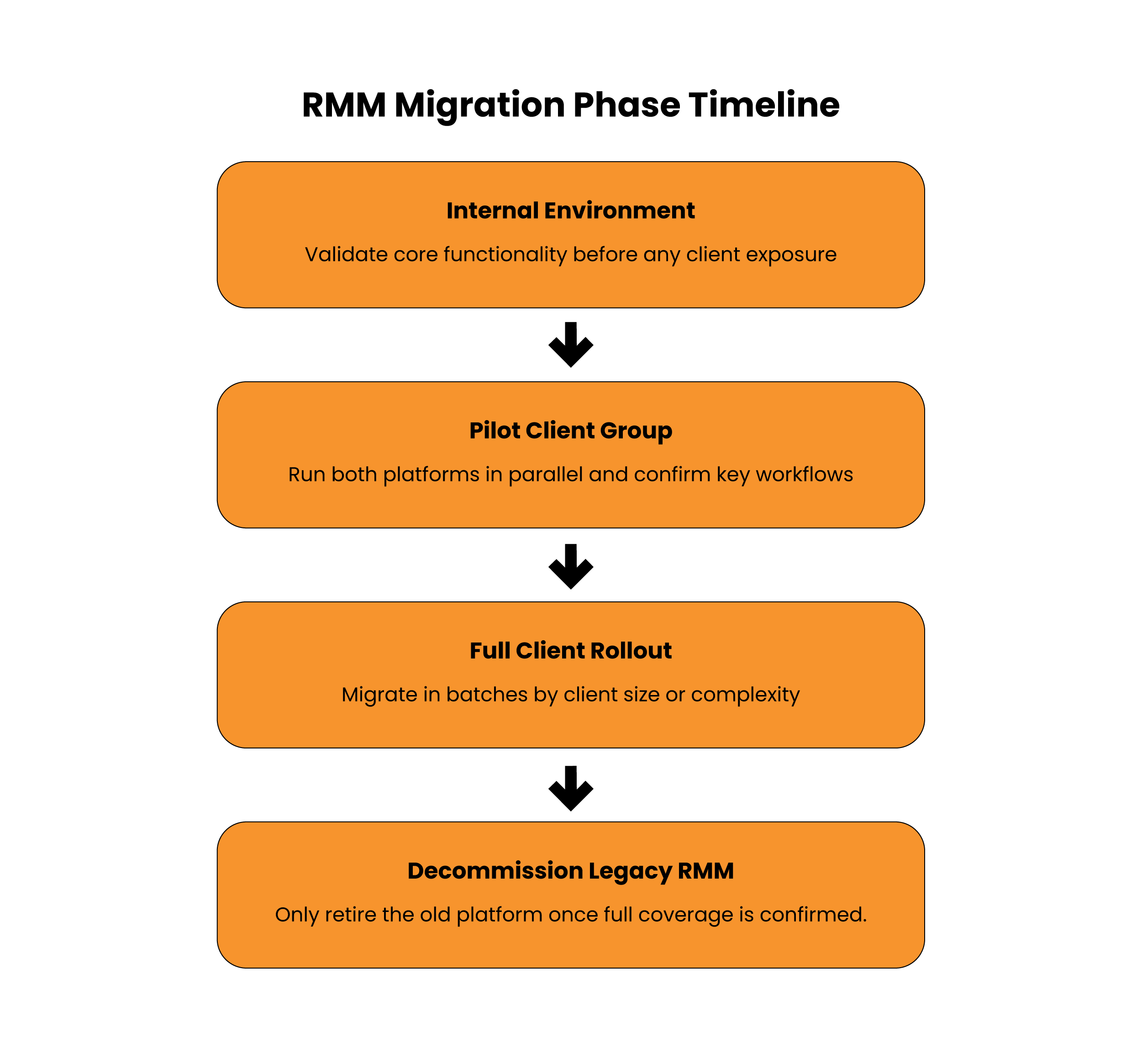
Let’s go through these phases.
Phase 1: Prioritize the Internal Environment
Deploy your new agent on the internal infrastructure before touching any client environments. This gives your staff the opportunity to get used to working with the platform in a low-risk environment, exposing any configuration issues early on. Moreover, it allows for validation of the core functionalities (monitoring, alerting, patching, remote access) without any exposure to clients.
Phase 2: Pilot Client Group
Choose a limited number of clients for your pilot cohort, going with clients who have the least complex setups and the most tolerance for any changes made to their managed services.
Move them entirely over to the new platform and continue to keep your previous RMM active with all other clients. Run both systems together in this phase to compare and determine if any gaps exist.
Here are the pointers to validate during the pilot phase:
- Alert accuracy and noise level compared to the old platform
- Patch management policies are applied correctly
- Whether the tickets are generated and updated as expected through PSA integration
- Technician workflows operating without friction
- Client-facing reporting is being generated correctly
Phase 3: Migrating All Clients
When the pilot stage confirms that the migration methodology and process publishing window work, it’s time to increase the migration size. This can be done by client size, industry, or environmental complexity.
Separating workstation and server migrations within all the businesses reduces the risks that may arise later and makes troubleshooting seamless.
Phase 4: Decommission the Legacy RMM
Once you are certain about full coverage under the new platform, it’s time to discontinue your use of the old platform. Maintain access to the old system for a given period post-migration, to allow quick access to historical data when required.
The Step Most Teams Tend to Skip: Automation Mapping
Automation is the step where most teams run into issues. When moving scripts and workflows, it’s common for existing ones not to transfer easily; the logic may need a rewrite, or the new tool may handle them natively.
Hence, for each automation, you must ask the following questions:
- Port: Can I simply port my script/workflow with no significant changes?
- Rebuild: Can I rebuild my existing script/workflow, as the underlying logic is still valid, but I will need to rewrite the syntax?
- Replace: Can I replace my existing script/workflow as the new platform has native support for that functionality?
- Retire: Should I retire the script/workflow because it no longer meets the current needs?
Look at migration as an opportunity to simplify rather than just recreate. That way, you will have fewer scripts and less alert noise than what you started with.
Monitoring Policies and Alert Settings
The RMM move allows teams to correct their alert fatigue. Avoid recreating the same configurations from the previous platform. Take time to review which alerts are being received and acted upon vs the thresholds set per client.
Also, are there duplicate alerts fired across the overlapping tools?
An ideal monitoring policy should generate fewer alerts with better signal quality, thus reducing the reactive workload that causes technician burnout.
5 Pitfalls Derailing RMM Migrations
- Migrating w/o cleaning the mess: Legacy scripts and orphaned monitors carried forward to the new platform complicate post-migration management to a higher degree than what you had when you migrated.
- Underestimating the automation rework: Many MSPs expect scripts to be ported over cleanly. Provide additional time for unexpected contingencies.
- Not training technicians adequately or completely skipping this step: An untrained technician will not have better success with a platform than a poorly-trained technician would have. Therefore, technician training should commence before the full rollout.
- Transitioning too quickly: A full transition from a production environment to the new platform without a period of parallel operation will result in a lot of operational disruption. A phased approach to transition takes longer, but provides a reduced risk of impact.
- Disconnecting the RMM-PSA integration without testing: The flow of the alert-to-ticket process is critical to operations for the RMM/PSA integration. Test this process thoroughly during the pilot phase prior to expanding to a broader deployment.
Timeline for a Successful Migration: What to Expect?
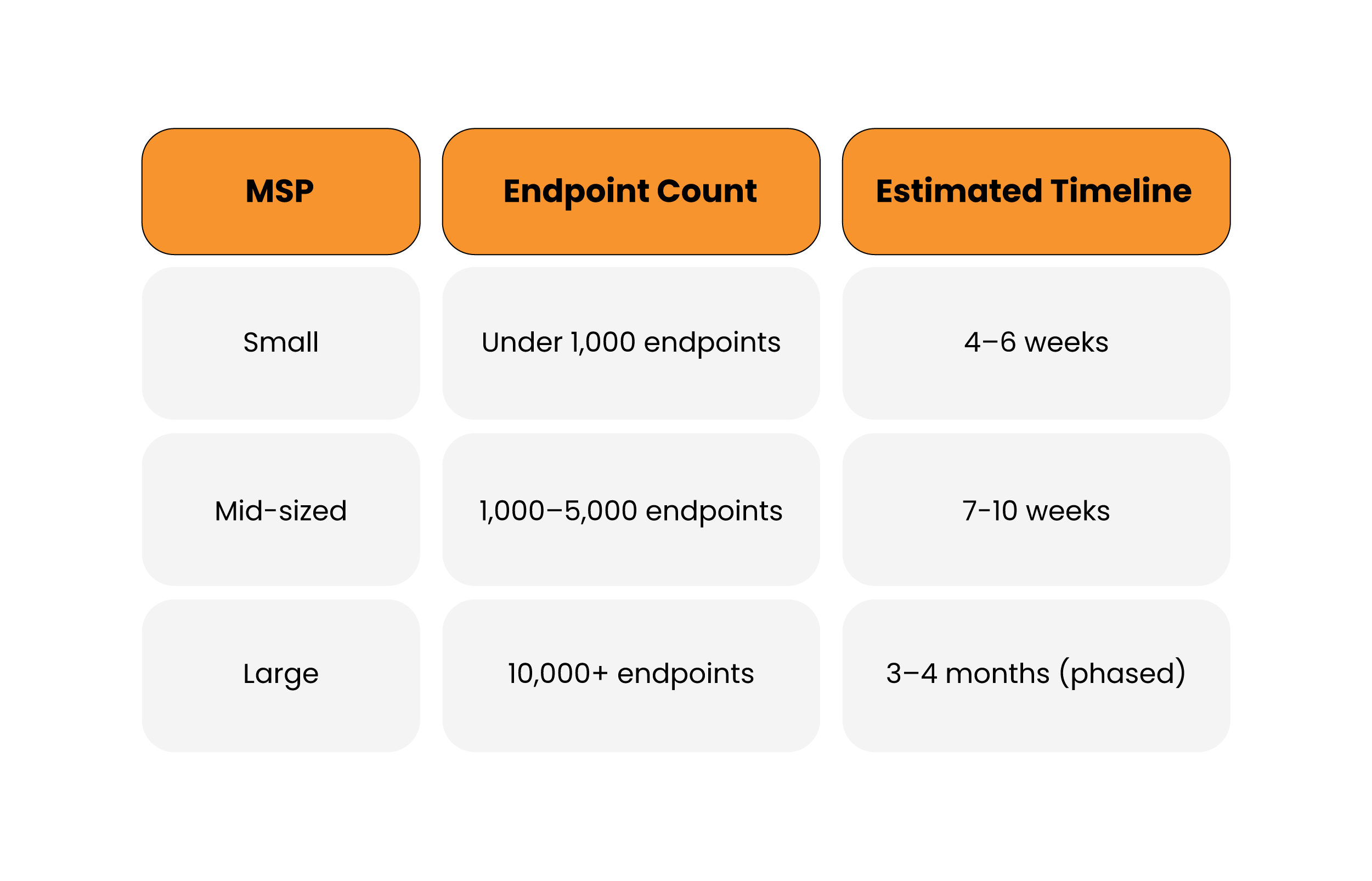
The timeline of the migration depends on several factors, such as the environment size, complexity, and team readiness.
Drawing from our experience, this table summarizes the timeline MSPs should expect.
Simplify Your RMM Migration
Infrassist helps MSPs migrate RMM platforms smoothly without disrupting client operations or technician workflows.
Conclusion
The RMM migration process encompasses automation, integrations, client delivery, and every technician’s daily workflow. The teams that succeed follow the same steps repeatedly – audit, controlled pilot, automation mapping, and staying in parallel mode till it is verified that both systems operate effectively.
If you are planning a switch and want a foolproof way to achieve it without impacting your clients, Infrassist’s RMM admin services can help. The services can help you build a foundation for proactivity and scalability with expert RMM administration.