White-label helpdesk outsourcing typically follows four pricing models. Per-ticket pricing suits fluctuating support volumes; per-user pricing works for predictable user bases; per-device pricing fits endpoint-driven support requirements; and a dedicated technician model suits MSPs with consistent, higher support volumes requiring assigned resources.
Key Takeaways
- White-label helpdesk outsourcing allows MSPs to deliver support under their own brand without building an in-house support team.
- Per-ticket pricing works well when ticket volumes fluctuate.
- Per-user and per-device pricing offer different ways to calculate support costs based on users or managed endpoints.
- Dedicated technician pricing suits MSPs requiring consistent support resources and predictable staffing arrangements.
- Pricing comparisons should account for coverage hours, support tiers, ticket limits and service inclusions, not just the quoted rate.
Two MSPs sign with the same provider at the same rate. Three months later, one is comfortable and the other is quietly losing money. The rate never moved. The difference lay in one line of the invoice, the billing unit, and that line settles who foots the bill the week a client’s server dies.
For MSPs that use white label help desk services, the pricing model directly affects service delivery costs and profitability. Providers may charge per ticket, per user, per device, or for dedicated technician capacity. Each model calculates costs differently, so the right choice depends on the MSP’s client contracts, support volumes, service commitments, and margins.
How Much Does White-Label HelpDesk Outsourcing Cost?
White-label helpdesk pricing varies by billing model, support scope and coverage hours. Publicly available provider estimates offer the following indicative figures:
| Pricing model | Examples of publicly published provider estimates |
| Per ticket | $10–$20 or $10–$25 per ticket |
| Per user | $3–$8 or $50–$100 per user/month |
| Dedicated technician | $1,800–$3,500 or $2,000–$3,500 per month |
These figures should be treated as published provider estimates, not standard industry rates. The considerable difference in per-user pricing highlights why service scope matters: coverage hours, support tiers, ticket limits and included services can change what a quoted rate actually covers.
Before comparing prices, MSPs should establish what counts as a billable ticket or user, which support levels are included, and whether the quoted fee covers business hours or round-the-clock support. A lower starting price does not necessarily mean a lower overall outsourcing cost.
What White Label HelpDesk Pricing Includes
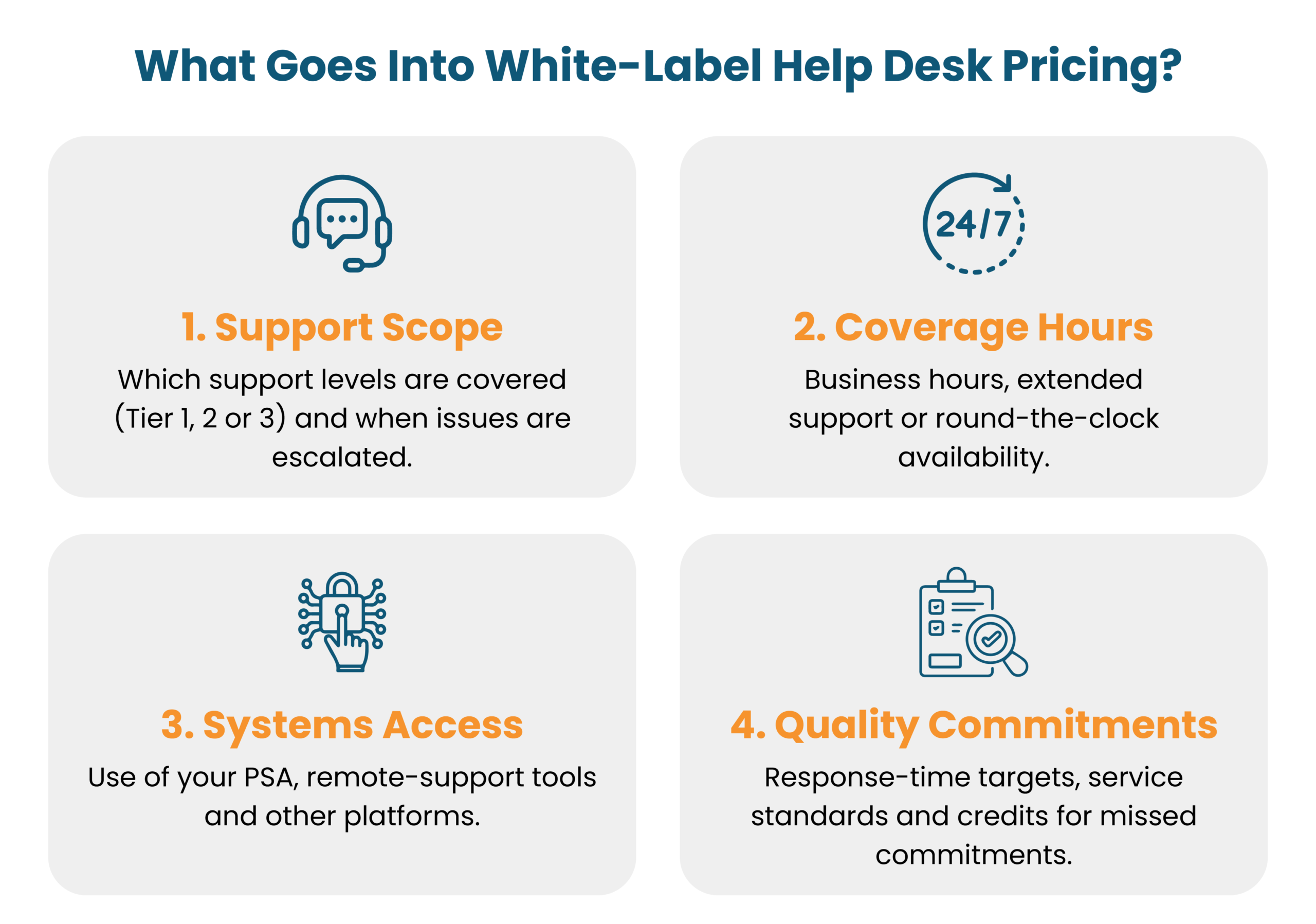
White label helpdesk pricing depends on more than the provider’s billing rate. The agreed service scope, support coverage, escalation responsibilities, tools access, and service-level commitments all affect what an MSP pays and what it receives.
Four things sit inside every rate. Scope comes first, meaning the point at which the technician hands a case back to your own people. That boundary is what sets tier 1 helpdesk outsourcing apart from deeper tier 2 and tier 3 support. Coverage is next: at 2 a.m., when a user’s laptop refuses to boot, somebody either picks up or nobody does. Third is systems access. Technicians either work inside your PSA and remote-support tools or from platforms of their own. Quality commitments round out the four: response-time targets, satisfaction thresholds, and the credit you’re owed whenever either slips.
When you shortlist a white label helpdesk for MSPs, start by skimming how each provider describes its managed helpdesk services, so you can see what the rate includes. List every component first. Compare numbers second.
Each pricing model affects those who bear three types of cost. Volume risk comes from changes in the number of support requests. Capacity risk arises when technicians must be available even during quieter periods. Service complexity risk occurs when requests take more time or require higher-level support than the agreed rate accounts for. Depending on the pricing model, these costs may fall on the MSP or the provider. Understanding this difference helps you assess which model is more suitable for your business.
Per Ticket Helpdesk Pricing
Per ticket billing sounds fair for IT helpdesk services. Work arrives, work gets billed, nothing is spent on idle hours. The catch is the word ticket. It means whatever your contract says it means. Same headline rate, two different contracts, and the invoices can end up miles apart. Until you’ve it clearly defined, its quoted helpdesk cost per ticket figure on the quote is little more than a guess.
Four questions go to the provider before any rate gets accepted. Get each answer in writing:
- 1. Monitoring alerts: Are all alerts generated by monitoring tools billed as helpdesk tickets, or only those that require technician action and are converted into tickets?
- 2. A user answers two days after closure. New ticket, new charge, or the old one reopened for free?
- 3. What happens when one mail outage produces fifty near-identical requests? They could be billed one by one, merged into a single case, or capped at a monthly ceiling.
- 4. A password reset is quick. A corrupted profile is not. One price for both, or tiers by effort?
Incentives matter here. Pay a provider per ticket and a fault that keeps returning keeps paying them. A printer that jams every Monday is the classic case. Each jam is a billable ticket for the provider and a complaint for you. Breaking the cycle takes knowledge-base articles, self-service password resets and a real look at root causes. The MSP, the provider, or both may handle these tasks, depending on the service agreement.
The money gap is large, too.
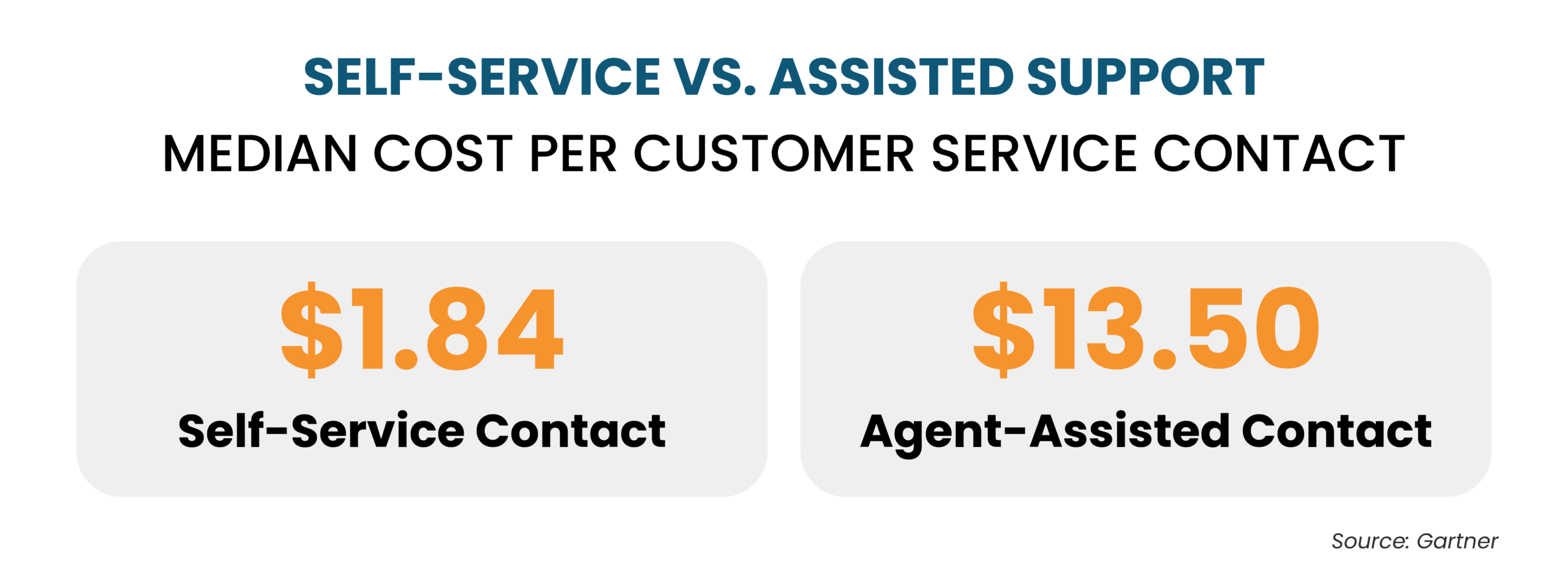
Gartner’s customer service benchmarks aren’t specific to IT, yet they put a self-service contact at a median $1.84 against $13.50 for an assisted one, and that gap is exactly what each deflected password reset puts back in your pocket.
Demand isn’t even either. A big patch run or an expiring certificate can fill the queue for days. Then it empties out again.
Ask for read-only access to the ticket log. It lets you match any invoice line to a real request, and that matters the moment a billing dispute starts. Understanding how an outsourced IT helpdesk support provider manages its support queue can also help you assess how tickets are handled and tracked.
Per User and Per Device Helpdesk Pricing
Nothing is easier to forecast than a flat charge per person, hence the appeal of per user helpdesk pricing to MSPs who already sell by the seat. The soft spot is head count. Staff numbers fluctuate, causing the monthly bill to change accordingly.
Monthly reconciliation keeps it accurate but adds paperwork. A yearly true-up avoids the paperwork and leaves growth unbilled for most of the year. Whichever you choose, make sure the true-up works both ways, so a departure earns you a credit the same way a hire earns the provider a charge.
Next, clarify what the provider counts as a billable user. Is it every active directory account, every licensed mailbox, or only a person who raises support requests? These definitions can produce very different monthly bills. Shared mailboxes, kiosk logins and accounts belonging to frontline staff may be counted even when they generate few or no tickets.
Also check how many tickets per user the provider has assumed while setting the rate. If a client’s employees generate more support requests than that average, the cost of supporting them can exceed what the per-user fee covers.
Per-device pricing is easier to justify in white-label NOC and SOC services, where monitoring involves keeping a continuous watch over devices across a client’s network. Per device helpdesk pricing, however, needs a closer look because device count does not always reflect support workload. People raise support requests; devices don’t. A manager carrying a laptop, phone and tablet could triple the bill without generating any additional tickets. This is why helpdesk pricing per endpoint can create a margin problem for MSPs that charge clients per user while paying their provider per device.
Counts drift for ordinary reasons, so these are worth auditing every quarter:
- People who’ve left, whose accounts stay live until offboarding is finally finished.
- Seasonal or short-term staff billed as full seats for the whole month.
- Servers and virtual machines that a discovery scan quietly adds to the endpoint list, with nobody deciding they belong in support scope.
- Replacement hardware that gets counted twice while a refresh cycle is under way.
Dedicated Helpdesk Technician Pricing
Dedicated seats are a different animal, and the dedicated helpdesk technician or an FTE (Full-time equivalent) model is the clearest example. Here, a fixed monthly fee for a helpdesk engineer secures dedicated technician capacity for your queue, either through a named engineer or a rostered resource, depending on the agreement. Ten tickets closed in a month or four hundred, the invoice comes out identical. Hours of attention are what’s on offer; nobody promises how many requests get resolved inside them. It behaves much like a staff hire, so the trade-offs in managed helpdesk services vs in-house IT apply here more directly than to the other three models.
The dedicated technician model works best when an engineer is assigned to your MSP and handles tickets only for your clients. Over time, the engineer becomes familiar with each client’s environment, recurring issues and support requirements. That knowledge makes it easier to build client-specific SOPs and knowledge-base articles, improve ticket triage and align responses with agreed SLAs. It also makes root cause analysis more effective because the engineer can identify recurring problems and incorporate preventive measures into service delivery. These advantages make dedicated IT helpdesk services more consistent as your client base grows.
What a seat costs hinges on three things: how senior the engineer is, how well they speak the client’s language, and which shift they cover. Put one question to the provider, namely how its offshore helpdesk technician cost breaks down into wage, overhead and margin.
An onshore reference point is useful too. The U.S. Bureau of Labor Statistics lists a median annual wage of $61,860 for computer user support specialists as of May 2025. The lowest 10% of workers earned less than $40,980. BLS also calls these workers help-desk technicians.
Run the coverage numbers next, because they change what dedicated means. Start with the calendar, which holds 168 hours in every week. One employee covers about 40 of them. A 24/7 white label helpdesk requires approximately five full-time technicians to cover one support position, before accounting for leave and sick days. In practice, dedicated frequently turns out to be a slice of a rostered pool and not one named individual.
Utilization is the other thing to watch. The fee stays flat, so every hour your technician spends waiting for work is an hour you’ve paid for. Four commitments make the model safer to sign:
- A notice period, with overlapping days, whenever the assigned technician changes.
- A written roster showing who covers leave and overnight hours.
- A monthly report on how busy the technician was, so idle hours show up in black and white.
- A ramp-up period of a few weeks, with an agreed target for when the technician should be handling the queue independently.
Helpdesk Pricing Break-Even: How to Pick the Model for Your Ticket Volume
Here’s an easy way to compare helpdesk pricing models: find the monthly ticket count at which two of them cost exactly the same. For per ticket vs per user helpdesk pricing, divide the per-user rate by the per-ticket rate. The answer is your helpdesk pricing break-even, in tickets per user per month. Against a dedicated technician, divide the monthly fee by that same per-ticket rate, and you get the count where the fixed fee starts to win.
For instance, take a client with 100 users and 130 devices. (The rates below are made up for the arithmetic. They are not vendor quotes or analyst benchmarks). Per ticket costs $9, per user $22, per device $16, and a dedicated technician $2,600, all billed monthly. Divide each flat bill by the ticket rate and per ticket stops being the cheaper option at roughly 231 tickets against the per-device bill, 244 against per user and 289 against the dedicated seat. Table 1 prices a quiet, an expected and a busy month. It also assumes, for illustration only, that one technician can close about 450 tickets; past that point a second seat comes into play.
Table 1: One client’s monthly cost under each model, using hypothetical modeling rates rather than market benchmarks
| Month | Tickets | Per ticket | Per user | Per device | Dedicated |
| Quiet | 150 | $1,350 | $2,200 | $2,080 | $2,600 |
| Expected | 250 | $2,250 | $2,200 | $2,080 | $2,600 |
| Busy | 420 | $3,780 | $2,200 | $2,080 | $2,600 |
Find the Right Helpdesk Pricing Model for Your MSP
Share your client’s user count, ticket volume and coverage needs. We’ll help you compare pricing models and find the right fit for your margins.
Look at how the three flat columns never budge, while per ticket starts as the cheapest option and ends as the most expensive. Budget for both low- and high-volume months, not just the expected month, so you can account for lower activity and unexpected ticket spikes.
For your own clients, the table needs these inputs:
- 1. A full year of tickets per client; the latest quarter alone can fool you.
- 2. Automated alerts and merged duplicates taken out, so the count matches what the provider would bill.
- 3. Divided by that client’s user total, month by month, with the median and the highest month marked.
- 4. Priced under every model at both of those numbers.
- 5. Compared against what an invoice that never moves would cost you.
Table 2 (below) turns your ticket history and client roster into clues about which model fits, so you can check before a quote arrives. Helpdesk for MSPs has wider context if you’re still mapping your client book.
Table 2: Choosing a Helpdesk Pricing Model by Client and Coverage Needs
| Per ticket | Wide swings between months, low average per user | Many small clients | Business hours only |
| Per user | Tickets per user stay inside a narrow band | Steady headcount | Extended but predictable hours |
| Per device | Counts follow endpoint totals more closely than headcount | Shared or fixed-purpose hardware | Shift-based use |
| Dedicated | Monthly counts sit above fee divided by ticket rate almost every month | A few large clients or a pooled book | Round-the-clock or fixed daily windows |
Hybrid Pricing, Client Markup and Contract Terms That Protect Your Margin
A hybrid helpdesk pricing model is the middle path, and it mixes two units. A base fee covers a pooled allowance of tickets, and an overage band charges a stepped rate once you go past it.
The provider gets a guaranteed minimum, you get a ceiling when volumes spike, and it’s a cost-effective route between the extremes of outsourced helpdesk pricing built on one unit. Set the allowance near the median month.
A higher allowance means paying for unused capacity, while a lower one can increase overage charges. This balance is worth considering when selecting an outsourcing partner for your MSP.
It’s easy to trip over one point in client-facing MSP helpdesk pricing: markup and margin are different animals. Start from a round $100 cost, purely for illustration. Mark it up 30% and you charge $130, though your margin is a mere 23% or so. A true 30% margin means dividing the cost by 0.70, which brings you to roughly $143. This calculation gives MSPs a practical starting point for setting a sustainable white label help desk markup for MSPs. Here’s how to apply it:
- 1. Convert the provider’s invoice into a monthly cost per client user.
- 2. Add your own costs on top, such as PSA licenses, escalation time and account management.
- 3. Divide the total by one minus your margin target; the result is your price.
- 4. Put a floor on every client’s monthly bill, so a tiny account never dips under cost.
- 5. Copy the provider’s overage bands into your client agreement, so extra charges flow downstream.
Agreements for IT helpdesk services can carry charges that never make it onto the headline rate sheet, so read the following line by line:
- A one-time onboarding fee, plus another for knowledge transfer.
- After-hours and holiday work billed at a premium on top of the base rate. Our guide to after-hours help desk coverage explains how providers usually structure this.
- Escalated work above tier 1, which may be billed by the hour.
- Auto-renewal terms, along with the notice window you need to cancel.
- Annual escalators, where the useful question is who sets them. BLS notes that the Employment Cost Index is increasingly used to adjust long-term purchasing contracts, and since a help desk contract is largely labor cost, an index like that is fairer than a figure left to the provider’s discretion.
- Exit terms, including who owns the knowledge base and documentation when the relationship ends.
Need Help with Choosing the Right Pricing Model?
Team Infrassist helps MSPs choose a white label help desk model that holds up when ticket volumes change. Share a few months of ticket data and we will show you where each pricing model breaks even.
Conclusion: Revisit the Pricing Model as Your Client Book Grows
A pricing model that suits twenty accounts may stop fitting at eighty. Client mix, headcount and request patterns keep moving underneath the contract, so recheck the choice whenever your book changes in a big way.