Most MSPs do not plan their tool stack from day one. Tools get added as problems come up, and over time, the stack just grows. By the time someone asks whether it all fits together, there are usually three overlapping tools, a billing gap, and a PSA that nobody fully trusts.
This guide cuts through that. Category by category, here is what a practical MSP tool stack looks like in 2026 and what you should factor in when choosing within each one.
How to Think About Your Tool Stack
Before you evaluate your MSP tool stack, these questions are worth working through. Not vendor evaluation questions; business questions.
How many clients are you managing with different environments?
A stack that works for 10 similar clients often falls apart at 40 when setups vary.
Where does your team tend to lose time?
Ticket resolution, billing reconciliation, and documentation chasing, the answer tells you which category to fix first.
What are your clients’ compliance requirements?
HIPAA, SOC 2, and Cyber Essentials have a direct bearing on your security and documentation choices.
How integrated is your current stack, really?
Technicians copying data between tools manually is not integration. It is a gap with extra steps.
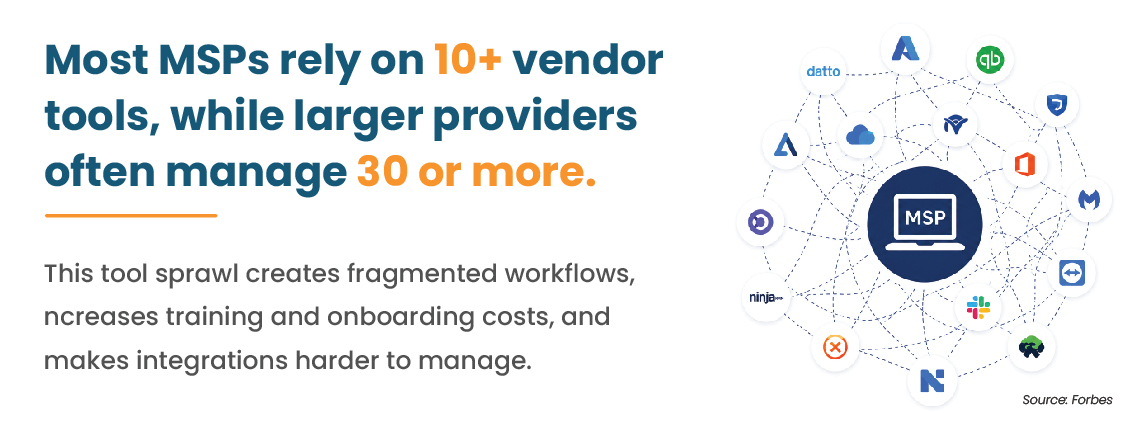
The issue is not the number of tools on its own, but their failure to communicate. Siloed platforms result in duplicate data, increased training needs, and communication gaps between tools.
Six Key MSP Tool Categories
A functional MSP tool stack covers six areas:
- RMM (Remote Monitoring and Management)
- PSA (Professional Services Automation)
- Security (EDR, DNS filtering, and backup)
- Documentation
- Identity and Access Management
- Client Reporting
RMM Tools
RMM gives your team visibility into every client endpoint including what is running, what needs patching, and what looks off. In its absence, teams often become reactive, waiting for clients to report issues that could have been identified earlier.
What to look for:
- Automation depth — can routine tasks run without a developer writing scripts every time?
- Patch management that holds up across mixed environments
- Multi-client dashboards that do not bury the important stuff
- Native PSA integration
Recommended: NinjaRMM, ConnectWise Automate, Datto RMM
While NinjaRMM offers ease of use, ConnectWise Automate has advanced automation capabilities; however, it requires investment for proper configuration. Datto RMM fits MSPs already in the Kaseya ecosystem. Still weighing these up? A head-to-head comparison of ConnectWise, NinjaOne, and Kaseya VSA is worth a look before committing.
PSA Tools
PSA handles ticketing, time tracking, SLA management, and invoicing. A PSA that frustrates technicians results in unlogged time, which means revenue walks out the door every month. The scope of a PSA is way beyond just a ticketing system. For most MSPs, it is the closest thing to a business operating system they have.
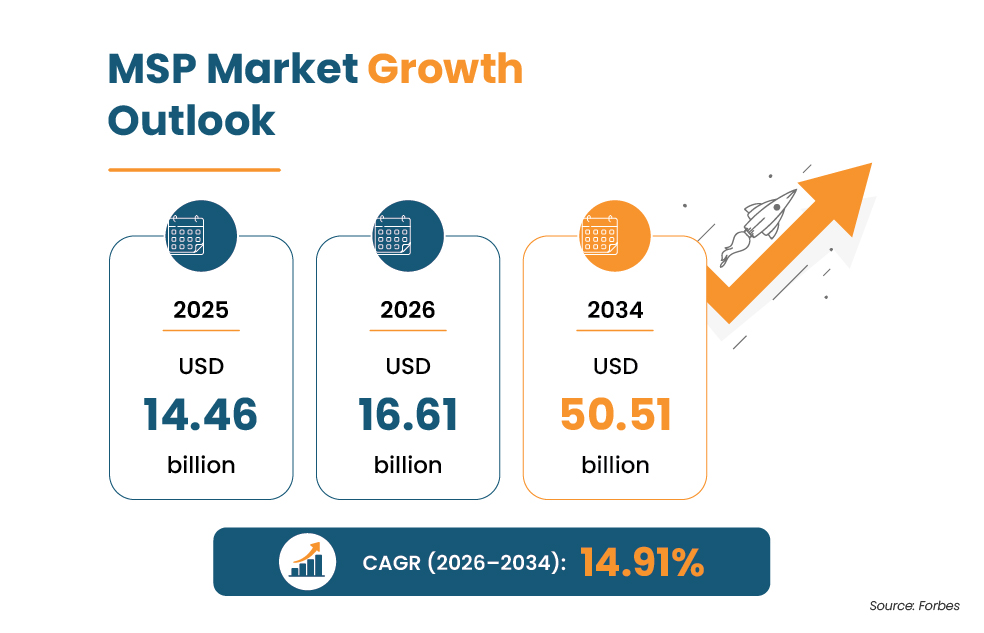
Rising PSA adoption highlights how MSPs are prioritizing automation and operational control. These platforms are pivotal to service management, billing, as well as business reporting.
What to look for:
- RMM integration that reduces manual ticket handling.
- Time entry that does not slow technicians down — friction here means it does not get done
- SLA breach visibility before it becomes a client conversation
- Billing that handles per-device, per-user, and block-hour contracts without manual workarounds
Recommended: ConnectWise Manage, HaloPSA, Syncro
HaloPSA is quite capable, well-priced, and pretty easy to configure. Syncro suits leaner MSPs who want RMM and PSA in one place.
Security Tools
Security is not a single tool decision. In fact, it is a set of layers, where each covers a surface or aspect that the others don’t. Skipping any one of them is a gap that will surface at the worst possible time.
EDR
The majority of endpoint attacks in 2026 do not look like the ones from 2022. EDR detects threats by monitoring process behavior, not just by checking a database of known threats.
If a script runs when it shouldn’t or a device starts connecting to unusual addresses, EDR can detect it. How the vendor handles multi-tenant licensing must be checked before committing.
Per-client costs tend to vary more than vendors like to advertise upfront.
Worth evaluating: SentinelOne, CrowdStrike Falcon Go, Malwarebytes for Teams
DNS Filtering
A lot of threats never reach the endpoint because DNS filtering blocks the domain before a connection is made. It is one of the easier controls to put in place and one of the higher-return ones, stopping a myriad of attacks at the earliest possible point.
When combined with 24/7 firewall monitoring, organizations gain an additional layer of protection that helps identify and respond to suspicious network activity in real time.
Recommended: Cisco Umbrella, DNSFilter, Webroot DNS
Backup and Disaster Recovery
Having backups does not equal recovery capability. The real question is how fast a client can be operational again after an incident, and whether your backup storage itself is protected from ransomware.
Before committing, verify:
- Actual restore time in a real test, not a vendor estimate
- Immutable storage that ransomware cannot touch
- Rollback capability for encrypted files
Recommended: Datto SIRIS, Acronis Cyber Protect, Veeam
Documentation Tools
Most MSPs underinvest here until something goes wrong. When a team member leaves, a new client is added quickly, or an issue comes up after hours, finding the right information can become difficult.
That is a documentation problem, not a people problem.
Capture from day one with every client:
- Network diagrams and IP schemas
- Admin credentials and access details (stored securely)
- Software licences and renewal dates
- Known issues and quirks specific to that client
- Escalation contacts
Recommended: IT Glue, Hudu
IT Glue is the established choice with deep PSA integration. Hudu costs less and covers the essentials well, a sensible pick for MSPs watching tool spend.
Identity and Access Management Tools
IAM has moved well beyond the enterprise. Managing who has access to what, and under what conditions, is now a standard expectation across client environments of every size.
In practical terms, IAM covers:
- Enforcing multi-factor authentication across all users
- Controlling which users can access which applications and data
- Providing single sign-on so users are not juggling a dozen passwords
- Giving MSPs visibility into access events across client environments
Recommended: Microsoft Entra ID, JumpCloud, Duo Security
Microsoft Entra ID is the natural choice for clients already in the Microsoft ecosystem. JumpCloud suits mixed environments with Mac, Windows, and Linux devices. Duo Security comes in handy as a bolt-on MFA layer where a full IAM platform is not warranted.
Client Reporting Tools
Clients do not see the work your team puts in day to day. They see the report at the end of the month. If that report is a spreadsheet thrown together in a hurry, it does not reflect well regardless of how solid the underlying work was.
What to look for:
- Automated report generation without manual data pulling
- White-label solutions including reporting
- Dashboards clients can read without needing a briefing
- SLA performance visibility that shows clients what they are actually getting
Recommended: BrightGauge, IT Portal, Gradient MSP
How Your MSP Tools Should Work Together
Individual tools are only part of the picture. The real value in an MSP stack comes from how those tools connect. The integrations that matter most:
- RMM to PSA: Alerts from your RMM should create tickets in your PSA automatically. If technicians are manually logging tickets from RMM alerts, time and context are being lost.
- Asset Sync: Device information from your RMM should flow into your PSA so billing reflects what is actually in place, not what was last manually updated.
- Security to RMM: Security events should surface inside your RMM dashboard. Switching between platforms to correlate an alert costs time and increases the chance something gets missed.
- Documentation to PSA: When a ticket is raised, relevant client documentation should be accessible from within the PSA. Technicians should not have to leave the ticket to find what they need.
- Billing Reconciliation: PSA billing should align with actual devices and recorded work without manual checks.
Gaps in any of these integrations create manual work, and manual work, at scale, is where MSP profitability quietly erodes. RMMs that are not yet handling this automatically are leaving time on the table, and advanced RMM automation use cases show where that gap typically sits.
Suite vs. Best-of-Breed: What Works in 2026
The suite approach means one vendor handles multiple categories – ConnectWise or Kaseya/Datto. Integration is tighter out of the box, and there is one vendor relationship to manage. The catch with suites is that you take the weak parts along with the strong ones.
Best-of-breed gives you more control over quality in each category, but someone on your team ends up owning the integration work. Getting tools to talk to each other takes time and sometimes a middleware layer.
In practice, most MSPs end up somewhere in between, a core suite for RMM and PSA, best-of-breed for security and documentation. If a platform switch is already on the table, the RMM migration guide for MSPs is certainly worth going through.
Questions to Ask Before Choosing a Tool
Before signing any contract, run through these:
- Does it integrate natively with your RMM and PSA? Or does it need a third-party connector that adds cost and another point of failure?
- Is this vendor MSP-first? Are the tools designed for SMBs or specifically for MSPs? It is important because that difference shows up in licensing, support, as well how multi-tenant management functions at the end of the day.
- What does support look like at your contract tier? Response times, escalation paths, whether you get a named account manager all of these matter when something breaks at midnight
- Does the pricing model hold up across your client mix? Per-device, per-user, and per-endpoint pricing all produce very different numbers depending on how your clients are structured. Run the numbers before you commit.
Thinking About a Stack Overhaul?
Knowing which categories to cover is one thing. Knowing which specific tools fit your client mix, your team size, and your budget is another. Infrassist can help you work through that without the trial runs.
Closing Thoughts
An MSP tool stack that grew without a plan will eventually need one. The cost shows up in wasted hours, overlapping tools, and integrations that half-work. Getting deliberate about what you run is not a one-time exercise but an ongoing call.
Start with the 6 categories covered here, be honest about where your current stack has blind spots, and treat integration as seriously as individual tool capability. The MSPs running the tightest operations are not the ones with the biggest stacks, but the ones who have made deliberate choices about what goes in and what does not.